EDR v15376 release notes – coming soon
NOTE Datto EDR uses a staggered release process. You receive an in-product notification when updates are available for your instance. To confirm the UI version running on your Datto EDR instance and to view or modify your scheduled maintenance window, see How to confirm your UI version and maintenance window.
Version information
| Endpoint Security Agent | Ransomware Agent | Rollback Agent | API |
|---|---|---|---|
|
3.17.1.5606 |
1.5.2.3 |
1.4.4.225 |
5.0.0 |
New features
Antivirus scan visibility in the Devices table
You can now monitor antivirus scan activity directly from the Devices table. This update introduces the following columns: Last AV Scan Time, Last AV Scan Type (Full scan, Quick scan), and real-time Scan Status. You can add these columns to the table via the Column Options icon. These additions enable quick visibility into scan history and progress without navigating away from the page.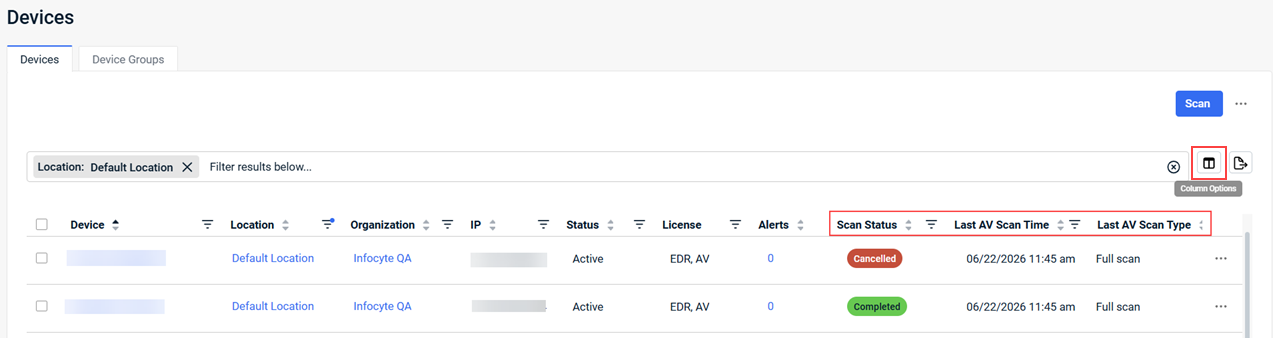
This update also removes individual AV scan tasks from the Task List and Tasks mini-map.
For more information, see Devices tab in the article Working with the Location details page.
File rollback from ransomware alerts
You can now perform file rollbacks directly from the Alert Details page. This update integrates rollback capabilities into the ransomware detection workflow, enabling administrators to initiate recovery actions from a ransomware alert.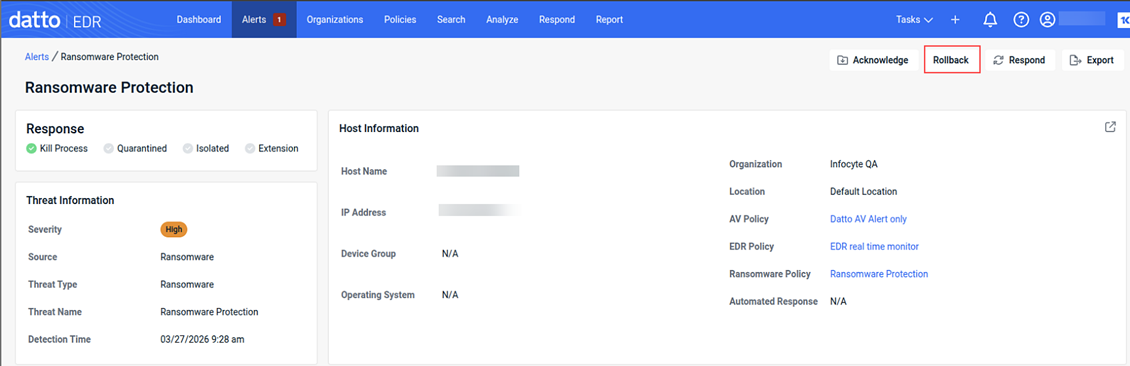
This enhancement reduces mean time to recovery (MTTR) and improves response efficiency. The system automatically logs a comment on the alert with the timestamp and initiating user to maintain auditability.
For more information, see Responding to ransomware alerts in the article Working with Ransomware Rollback.
AI-driven Security Insights
You can now use AI-driven Security Insights to gain a deeper understanding of your location-level security posture. This feature analyzes 30 days of alert metadata to generate a comprehensive summary, detect anomalous host behavior, and identify opportunities for alert suppression.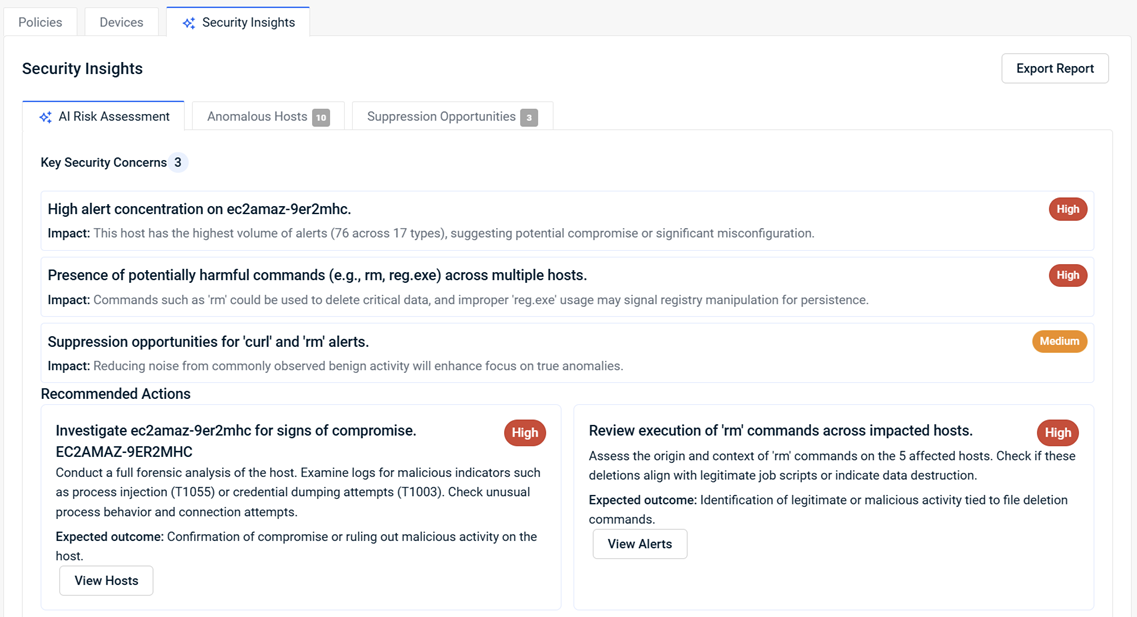
With these insights, you can quickly prioritize high-risk devices and reduce unnecessary alert noise, allowing you to focus on genuine threats. For more information, see Security Insights.
Enhancements
Policy assignment search
You can now quickly locate and assign security policies using a type-ahead search in the Assign Policy dialog box. This enhancement improves usability in environments with a large number of policies by filtering the list as you type. For more information, see Assigned Policies in the article Leveraging the Organization details page.
Improved proxy connectivity resilience
This update improves agent reliability in proxy-restricted environments by introducing a staged retry mechanism. The agent now uses exponential backoff (from 5 minutes up to 4 hours) to re-establish proxy connections before falling back.
This ensures consistent communication while maintaining the intended network routing path.
Proxy settings inheritance for Ransomware Detection and Rollback
Ransomware Detection and Rollback components now inherit proxy settings defined in the agent's configuration, improving support for partners operating in proxied network environments.
Automatic apex domain inclusion for wildcards in DNS Secure
When you enter a wildcard domain (for example, *.example.com) to configure DNS Secure blocklists and allowlists, the system now automatically includes the apex domain (example.com) and all its subdomains in the policy.
This eliminates the need for duplicate entries and ensures consistent enforcement across domains and subdomains. For more information, see Configuring blocklists and allowlists in the article Configuring Datto DNS Secure.
Improved application error experience
You will now experience a more helpful interface if an unexpected application error occurs. This update replaces generic error messages with a branded error page that provides clear instructions for resolution. The new screen allows you to easily refresh the page or use a one-click Copy Error button to capture diagnostic details for support.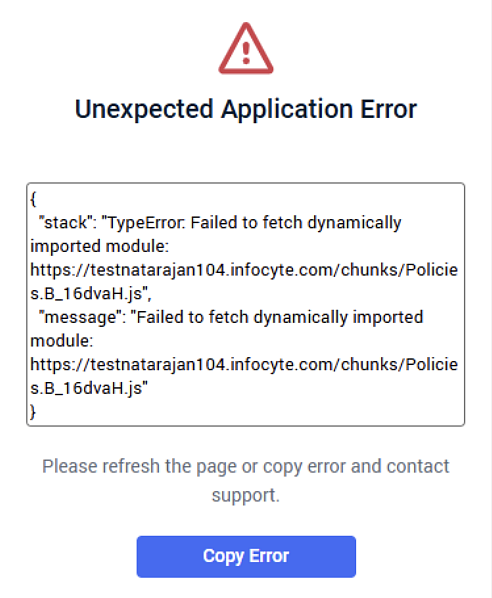
This improves usability and simplifies issue reporting.
You can now filter the Activity Log by the ItemId column to quickly isolate specific platform actions. This enhancement lets you search for unique identifiers, such as policy UUIDs, improving the efficiency of auditing changes, alert responses, and uninstall actions.
Fixes
The following issues have been resolved:
- KaseyaOne telemetry data (including billing and utilization metrics) did not send for clients in AP and EU regions.
- Pagination and search failed for device groups with more than 25 devices. You can now view up to 100 devices per page and use search across all pages.
- The Locations table displayed incorrect device counts for locations with zero devices. Device counts are now accurate across all views.
- Deleted locations continued to retain policy associations, preventing policy removal. Policy assignments now clear correctly when locations are deleted.
- Gaps in EDR agent data reported in MyITprocess. Data is now consistently reflected in QBR reports.
- Policy inheritance logic issue that caused scheduled Datto AV scans to exclude certain device-grouped agents.
- The system tray icon would disappear and fail to return if the process was terminated. The system now ensures the tray icon correctly respawns under the active user context, maintaining consistent access.
Artifacts
agent.linux-amd64.5c38c05920aa0715d7ef4137f5f22490d0c9f76ff837727391eadf435750990a.bin.gz
agent.linux-arm64.d8e61d8aaa4a9d61bdb610f09316eb81e2b65ee2ce3ccf33a6e3cd29bc2d5186.bin.gz
agent.linux-x86.59fa7bd4e451ced4a100d86b41d426572073aa37f58df4522ab88c548b9a4767.bin.gz
agent.macos-amd64.e42c495090ec41c1072ee16129ad29412f98cf1ae2b85b7a287843416cf41b60.bin.gz
agent.macos-arm64.21fc5b3a16b65e5e860971324ea805a779b62cb11f23a634821de115eb9864db.bin.gz
agent.windows-amd64.9edfdee04b53795fb06b25282736e091127a629665365ba3be892f2ccc9c5f2a.exe.gz
agent.windows-arm64.37d4ef5c3cde62a25800fd41b95f3074feb3427817fd51f8e39a3b31745b4956.exe.gz
agent.windows-x86.b83da3a6693cc55b5e65054cafc9a874faf4c89effd217db56777de14a1de24e.exe.gz


