EDR v15901 release notes – released September 24, 2026
NOTE Datto EDR uses a staggered release process. You receive an in-product notification when updates are available for your instance. To confirm the UI version running on your Datto EDR instance and to view or modify your scheduled maintenance window, see How to confirm your UI version and maintenance window.
Version information
| Endpoint Security Agent | Ransomware Agent | Rollback Agent | API |
|---|---|---|---|
|
3.17.1.6452 |
1.5.2.3 |
1.4.4.225 |
5.0.0 |
New features
Hash-based AV exclusions (Windows only)
You can now exclude files from Datto AV detection using SHA-256 hashes, giving you a more precise way to manage false positives. Unlike path-based exclusions, hash-based exclusions remain effective if a file is renamed or moved. You can create hash exclusions directly from the Alert Detail page by clicking Create Exclusion. When you select Hash from the Type drop-down, the SHA-256 value is populated automatically. Note: Hash-based AV exclusions are supported on Windows operating systems only.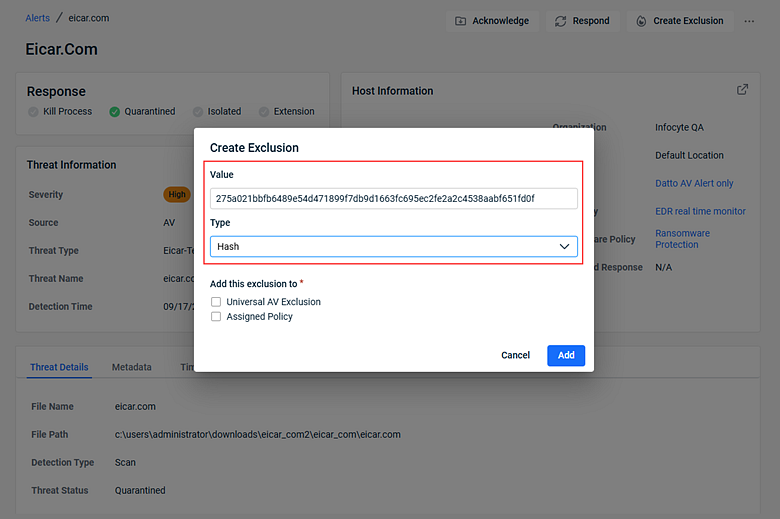
You can also create and manage hash-based exclusions within an AV policy or globally through Universal AV Exclusions. See Working with exclusions in your Datto AV policy.
In-app support with Kaseya Assist
Datto EDR and Datto AV now include an AI-powered support chatbot, available directly within the platform. The assistant answers questions using Kaseya help documentation and can escalate to a live support agent when needed. The chatbot recognizes your account details to provide relevant, personalized assistance without requiring you to leave your current workflow.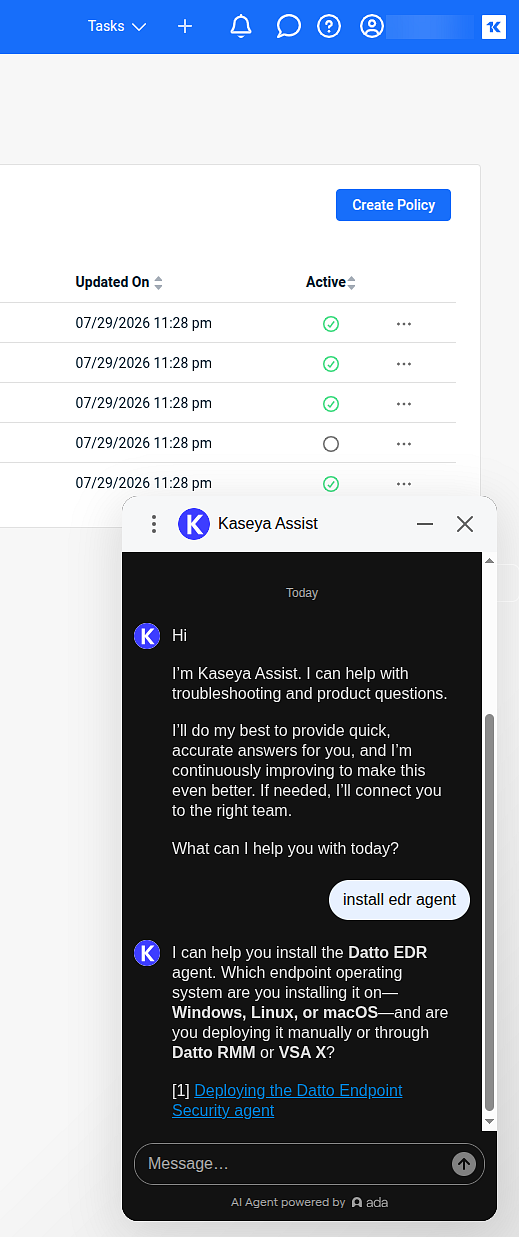
Enhancements
Rollback agent upgrade
The Rollback agent has been upgraded from .NET 8 to .NET 10 to maintain compliance with Microsoft support policies and leverage modern framework improvements.
Ransomware policy default raised to Enhanced
New ransomware policies now default to the Enhanced detection setting instead of Standard, providing stronger protection out of the box. This applies to all new tenants and newly created policies. Existing policies are not affected. 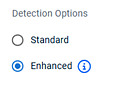
See Working with Ransomware Rollback and Working with Enhanced Ransomware Detection.
Improved AV file submission comments
The Datto AV File Submission workflow now captures user comments more reliably, providing clearer context to analysis teams when you submit a file for review. 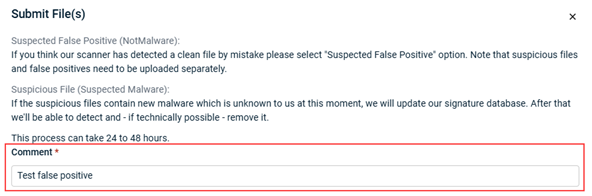
Automatic PSA credential cache invalidation
The platform now automatically detects and clears stale Autotask integration credentials after repeated connection failures or prolonged disconnections. When you reconnect or update PSA settings, the platform validates against the live Autotask API, eliminating the need for manual intervention to resync your integration.
Updated device icons
Device icons throughout the platform have been updated to better reflect the endpoints you manage. The cell phone icon has been replaced with a laptop icon in the left-hand navigation menu and on the Device details page.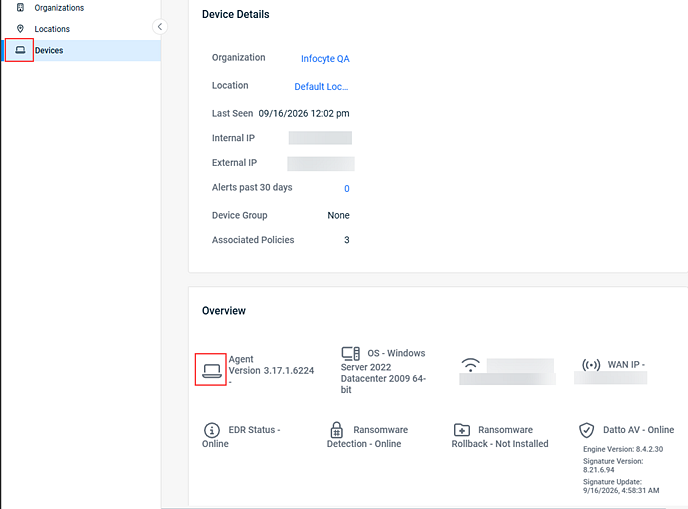
Analysis engine selector for custom detection rules
When creating or editing custom detection rules, you can now choose between Local and Cloud analysis engines. This lets you route complex rules that require reputation checks or cross-endpoint correlations to the cloud while keeping simpler rules processed locally. 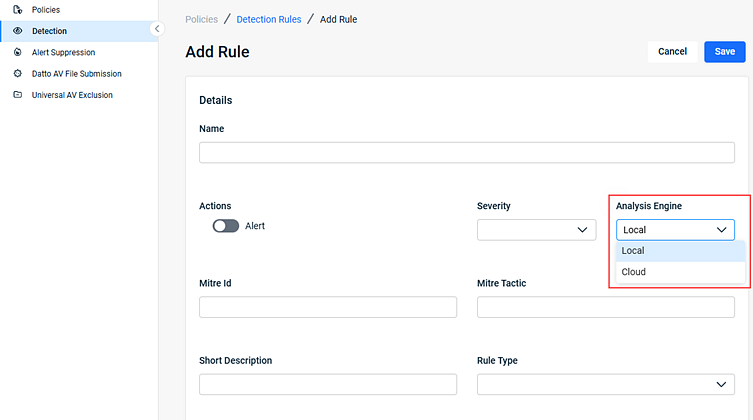
Response table tooltip for truncated entries
Entries in the Execution & Summary column of the Responses table are no longer cut off without recourse. Hovering over a truncated entry now displays a tooltip with the complete text, including full file paths for quarantined items and detailed error messages.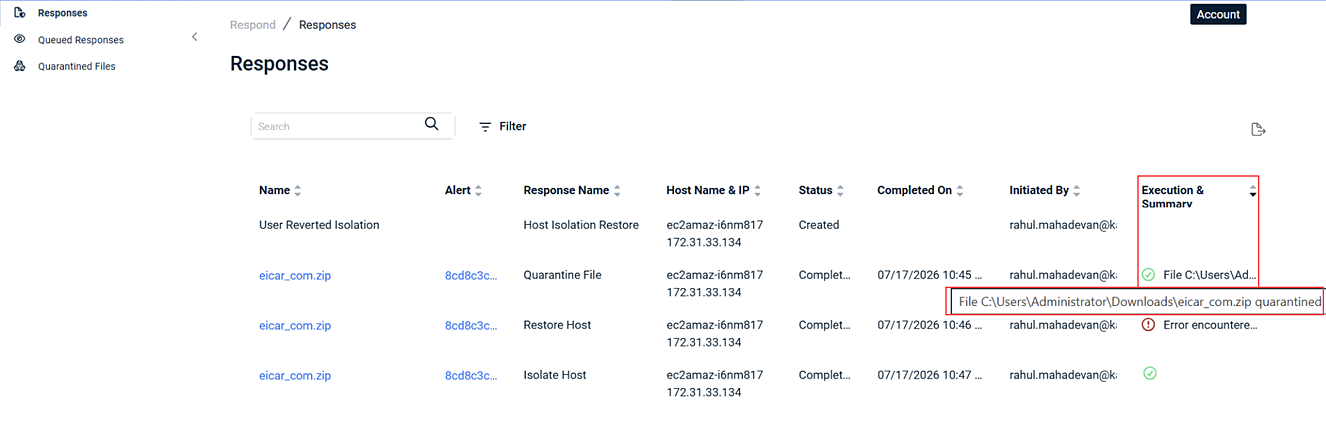
Fixes
-
Resolved a high-frequency logging issue where the Datto EDR integration repeatedly attempted to query devices that had been deleted from VSA 10. The integration now confirms device availability before attempting synchronization.
-
Fixed an issue where VSA 10 and Pulseway integration settings, including severity and source type checkboxes, appeared blank after navigating away from the configuration page and returning, even after saving. Your integration preferences are now displayed and maintained correctly.
-
Fixed a bug in the license renewal workflow that prevented security policies from returning to an Active state after a subscription expiration was resolved. Policies now reactivate automatically, without requiring manual cloning or recreation.
-
Resolved an organization mapping issue that caused some managed locations to be missing from myITprocess QBR reports, Autotask PSA, and the KaseyaOne platform. Active site and location data now synchronizes correctly across all integrated modules.
-
Fixed a navigation issue on the Locations page where assigning or unassigning a license caused the device list to reset to the default 25-row view, regardless of the row count previously selected. Your preferred display count is now maintained throughout the workflow.
-
Resolved an error that occurred when deleting all devices on the first page of the device list, which occasionally returned a 400 Bad Request response. Bulk deletions on the initial page now complete without error.
-
Fixed an issue that prevented new Datto EDR and KaseyaOne integrations from synchronizing correctly when no existing organization mappings were present. New integrations can now complete initial synchronization as expected.
Artifacts
agent.linux-amd64.fadf7a5b847983c3aa5bb2e9cb091686ec578ef49116e6044cd006be96715125.bin.gz
agent.linux-arm64.98a64d7daff49f02b9b0ab1d5583a11668f4cff5bff505db7b2a65f85bb8c842.bin.gz
agent.linux-x86.77a8c72054ffa12cc57f6e8f393af13e4dd0def0e8eb35b13b2152b6a59a9ae7.bin.gz
agent.macos-amd64.d08c9791d0b6581016051a14650e614345c80ef61b29907f452e0f031a76ffc7.bin.gz
agent.macos-arm64.e6e3b3ca51e758b18a468de299169e3f5bdd6381bee84c6dfdd8b11e155020e4.bin.gz
agent.windows-amd64.17bad39ea3339204999300c14715ad3e8fd76edc661d0796308c68fdde8df84c.exe.gz
agent.windows-arm64.983edc91a1199c27a2d611ee81936be0dd7e9068e0c6eb9fed75f7ab4dc7b01e.exe.gz
agent.windows-x86.b54a7d84f030b735211af4475091342ab456602bd53da3954566e495aa332bf6.exe.gz


