Working with Enhanced Ransomware Detection
NAVIGATION Policies
PERMISSIONS Datto EDR subscription with administrator, analyst, or external analyst-level platform access
PERMISSIONS Service account or administrator-level rights on the target endpoint
Overview
Datto EDR's Enhanced Monitoring feature improves ransomware detection by deploying the Datto Rollback service in a low-overhead monitoring mode. In this mode, the Rollback service supplies real-time process and file telemetry to the ransomware detection engine, enabling faster detection and more aggressive containment, without tracking file history for recovery.
What’s improved
- Faster ransomware detection: When the ransomware process can be identified through Rollback telemetry, detection can trigger after as few as three encrypted files (compared to 10 with Standard detection), stopping attacks earlier in the encryption cycle.
- Smarter, more aggressive containment: Terminates not only the offending process but also its parent and grandparent processes, and blocks the suspected ransomware process from restarting, minimizing blast radius.
- Write blocking at the driver level: Suspected ransomware processes can be blocked from creating, modifying, renaming, or deleting files on disk while containment completes.
- Improved rollback efficiency: File rollback is more targeted and configurable, allowing protection of critical folders and file types without full-disk tracking overhead.
- Lower performance impact: Enhanced detection leverages lightweight, in-memory Rollback telemetry without significant resource usage increases.
- Better operational control: Rollback and response actions are preserved during upgrades, ensuring no disruption to existing configurations.
Why This Matters
- Faster recovery (lower MTTR): Quickly restore critical business files so you can get back to work sooner after an attack.
- Less business disruption: Early detection and aggressive containment reduce file impact.
- Practical ransomware protection: Enhanced Ransomware Detection is not a backup replacement. It complements backup solutions by addressing time-critical recovery needs.
- Balanced security and performance: Strong ransomware protection without over-provisioning systems.
Requirements
- You must have an active Datto EDR subscription.
- Ransomware detection must be enabled and configured with the Enhanced option. For more information, refer to Ransomware configuration options.
- The Datto Endpoint Security agent must be installed on all endpoints you wish to monitor and those devices must be able to communicate with your EDR instance.
- Enhanced Ransomware Detection is supported on the same operating systems as Standard detection: Windows 10 and above and Windows Server 2012 and above.
What gets installed on the endpoint
Enhanced Monitoring is powered by the Datto Rollback service. When you enable the Enhanced detection option in your ransomware policy, the Rollback service components are deployed to all monitored, supported endpoints, even if File Recovery is set to Disable. You should expect the following components to install:
- Kernel minifilter driver
- Datto Rollback Driver Service (Windows service)
- Datto Rollback Updater, Datto Rollback Status, and Datto Rollback Autorepair scheduled tasks
- Rollback Driver Desktop application and Start Menu shortcut
- A hidden tracking folder ($.td) in the root of each supported volume
When File Recovery is set to Disable, the Rollback service runs in a low-overhead monitoring mode. It observes file activity in memory to attribute it to processes for the detection engine, but it does not copy file data, keep file history, or consume the tracking cache. In this mode, file recovery (rollback) is not available and the Rollback Driver Desktop application will not show tracked file changes. Selecting Full Disk Tracking or Folders & Extensions enables full file tracking and recovery in addition to enhanced detection. For details about the components and their management, refer to Working with Ransomware Rollback.
NOTE To prevent the Rollback service from installing on a specific device, refer to the "Controlling Ransomware Rollback installation" section of Working with Ransomware Rollback.
Comparing Standard and Enhanced Ransomware Detection
The following table summarizes key differences between Datto EDR’s Standard and Enhanced Ransomware Detection.
| Feature | Standard | Enhanced |
|---|---|---|
| Detect file changes to alert against ransomware activity | Available | Available |
| Attribute file activity to the responsible process by using Rollback driver telemetry | Not available | Available |
| Detect attacks after as few as three encrypted files instead of 10 | Not available | Available |
| Kill suspected ransomware process | Available | Available |
| Kill parent and grandparent process of suspected ransomware process | Not available | Available |
| Block suspected ransomware processes from writing to disk and from restarting | Not available | Available |
FAQs
 Does Enhanced Monitoring install anything on my endpoints if File Recovery is disabled?
Yes. Enhanced Monitoring deploys the Datto Rollback service components in a low-overhead monitoring mode even when File Recovery is set to Disable. The service provides process telemetry to the detection engine but does not keep file history, so rollback/recovery capability is not available in this configuration. See "What gets installed on the endpoint," above.
Do I need a leading dot for custom extensions (e.g., .txt) defined in the Folders & Extensions option?
No. Enter the extension name (e.g., txt). If a leading dot is detected, it will be removed automatically.
Can I write custom paths like C:\CustomFolder1\?
No. Custom paths are not supported currently.
Is cache retention limited to 7 days?
Yes. Cache retention can be set to a maximum of 7 days.
Do custom extensions under Folders & Extensions apply as exclusions or inclusions?
They apply as inclusions. The Rollback agent monitors file changes for the custom extensions you specify, in addition to the file categories selected in the policy. This monitoring enables file recovery for those file types and provides additional telemetry that helps improve ransomware detection.
Do the Folders & Extensions selections affect what Enhanced detection can see?
No. Folder and extension selections apply only to file recovery and determine which files the Rollback agent tracks for recovery purposes. Enhanced detection collects telemetry independently and is not limited by the selected folders or file extensions.
If File Recovery is set to Disabled, folder and extension selections have no effect because file tracking for recovery is not performed.
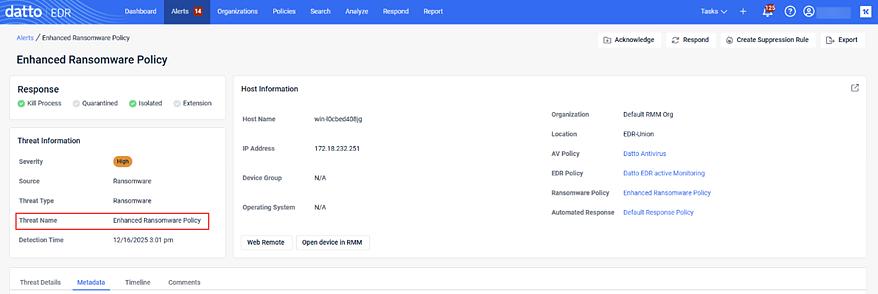
How will Enhanced Ransomware Policy alerts appear in the portal?
Alerts will appear with the same look and feel as standard ransomware alerts.
Alerts page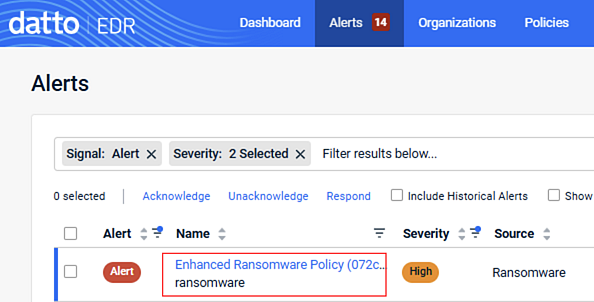
Alert Detail page
Are there additional license types or costs for Enhanced Monitoring?
No. Enhanced Ransomware Detection is included in your Datto EDR subscription.
Why use Standard over Enhanced Monitoring?
Standard monitoring may be preferred in environments where minimizing resource usage is critical. Enhanced monitoring adds advanced protection but runs an additional low-overhead service, which can slightly increase resource consumption.
| Revision | Date |
|---|---|
| Initial release. | 12/17/25 |
| Technical review against agent source: added What gets installed on the endpoint section documenting Rollback component deployment in low-overhead mode when File Recovery is disabled; corrected detection thresholds (3 vs. 10 encrypted files); corrected custom-extensions FAQ (inclusions, not exclusions); clarified OS support is the same as Standard detection; expanded Standard vs. Enhanced comparison. | 8/7/26 |
| Added Important at top: As of release v15866, new ransomware policies default to the Enhanced detection setting instead of Standard. Deleted FAQ: Will Enhanced Monitoring automatically be enabled in my ransomware policy after this upgrade? | 9/17/26 |


