EDR v15646 release notes – released August 26, 2026
NOTE Datto EDR uses a staggered release process. You receive an in-product notification when updates are available for your instance. To confirm the UI version running on your Datto EDR instance and to view or modify your scheduled maintenance window, see How to confirm your UI version and maintenance window.
Version information
| Endpoint Security Agent | Ransomware Agent | Rollback Agent | API |
|---|---|---|---|
|
3.17.1.6123 |
1.5.5.10 |
1.4.5.234 |
5.0.0 |
Datto Ransomware Detection - Q3 2026 update
We've released a major update to the Datto Ransomware Detection engine, now shipping with Datto EDR. This release expands protection against newly emerging ransomware families, detects several active strains earlier in the attack, and reduces false positives. It's fully backward-compatible and deploys automatically. No action is needed on your part. For details, see Datto Ransomware Detection - Q3 2026 update.
New features
Redesigned Automated Response policy
You can now configure automated threat responses by severity level using three preset templates: Minimal, Moderate, and Aggressive. Each template defines which actions (Kill, Quarantine, or Isolate) apply at Low, Medium, High, and Severe severities, so you establish a consistent baseline across all detection rules without configuring each rule individually. For finer control, you can still set rule-specific overrides that take precedence over the severity-level settings. Existing policies are automatically mapped to the closest template, and any unique configurations carry over as rule-specific overrides. 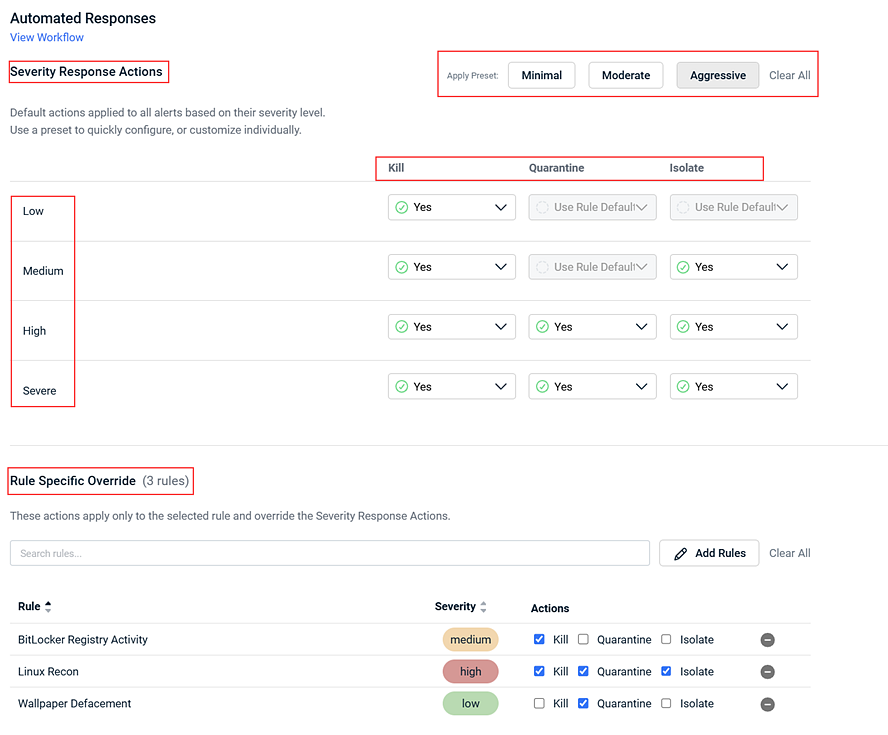
Refer to What are automated response policies?
Enhancements
Alert suppression workflow
Create and manage alert suppressions more efficiently with a streamlined workflow and new side-panel interface.
When creating a suppression from an EDR alert, suppression fields are automatically populated using the alert metadata. Saving the suppression also automatically acknowledges the original alert.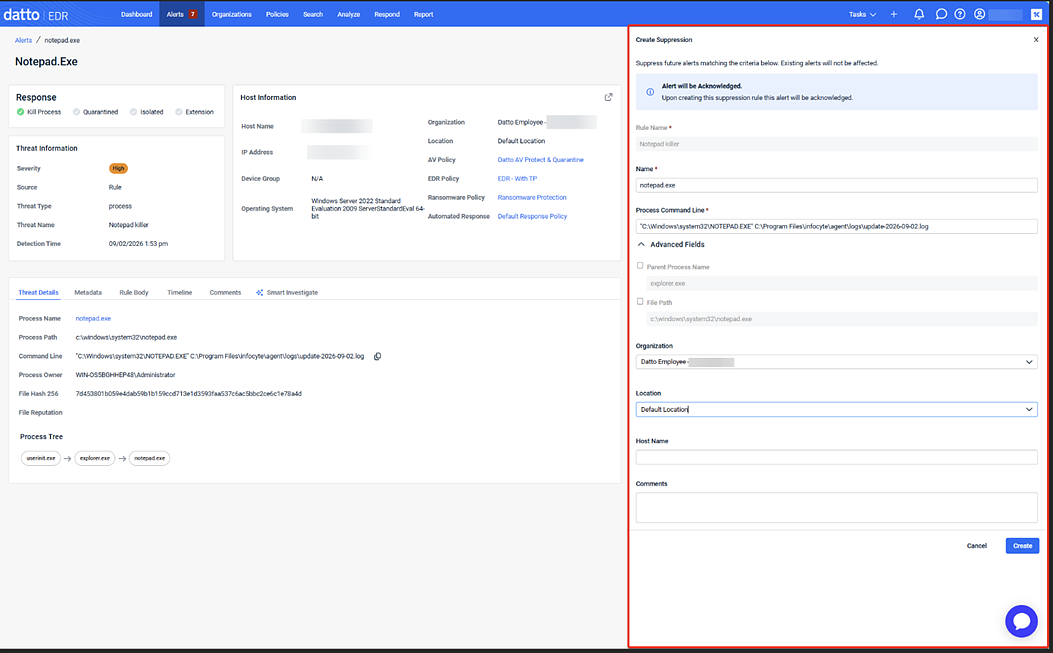
Additional improvements provide greater control over alert noise:
- Save suppressions as pending for later review.
- Publish suppressions immediately to suppress future alerts.
- Prevent automated response actions for matching alerts.
- Apply suppressions across specific organizations or locations.
Refer to Suppressing alerts.
AV file submission Verdict field
The Datto AV Submission Table and Submission Details pages now display a Verdict field that shows either Clean or Not Clean for each completed file submission. You can immediately see the final scan result without parsing raw data, and take next steps such as adjusting exclusions or maintaining quarantine based on that verdict. The Verdict field on the Submission Details page appears only when the submission status is Completed. 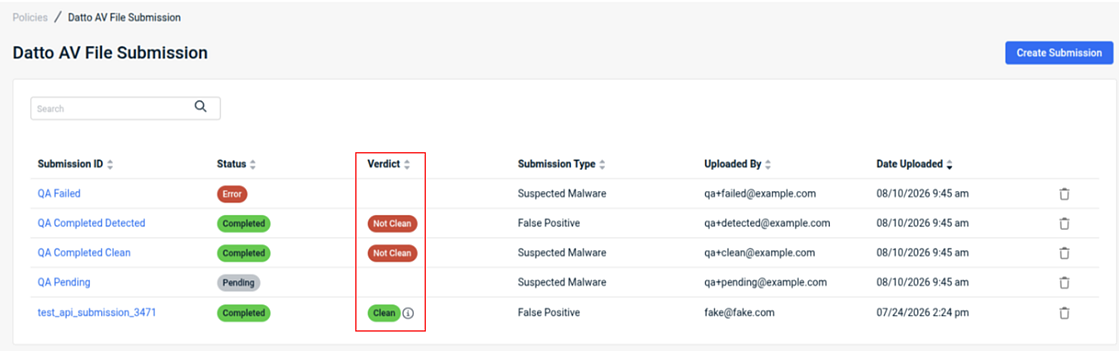
Refer to Datto AV File Submission
SSL Interception controls for DNS Secure
You can now manage SSL Interception settings at the policy level within Datto DNS Secure, choosing to intercept all HTTPS traffic, limit interception to recommended applications, or disable it entirely for specific endpoint groups. This is useful for environments such as VoIP servers where TLS decryption can introduce latency or break certificate-sensitive protocols. For existing policies that already have DNS Secure active, SSL Interception defaults to Intercept Recommended Apps Only to preserve current protection. New policies default to off, allowing you to opt in based on each endpoint group's requirements. 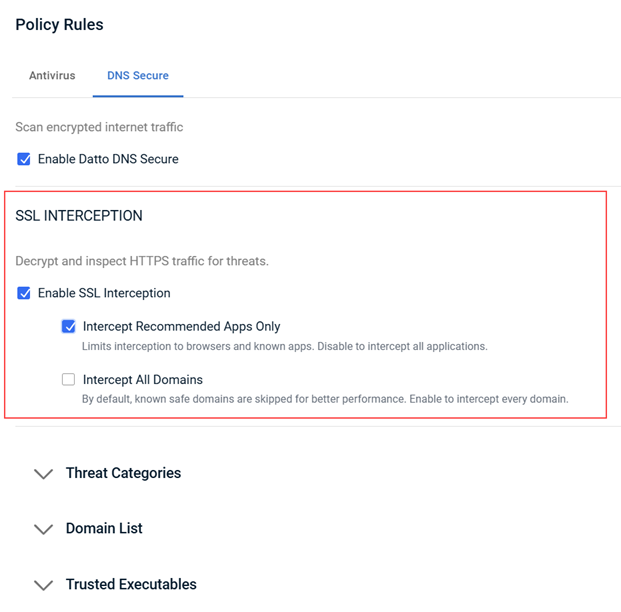
Refer to Configuring Datto DNS Secure.
Task List filtered to user-created submissions
The Task List now shows only user-created file submission tasks, reducing noise from system-generated entries. This makes it easier to track the submissions you initiated and review their outcomes.
Refer to Viewing the Tasks page.
Simplified device status indicators
Agent Status indicators now show one of three states: Online, Offline, or Isolated. This consistent, reduced set of statuses makes it faster to assess endpoint availability and isolation state at a glance. 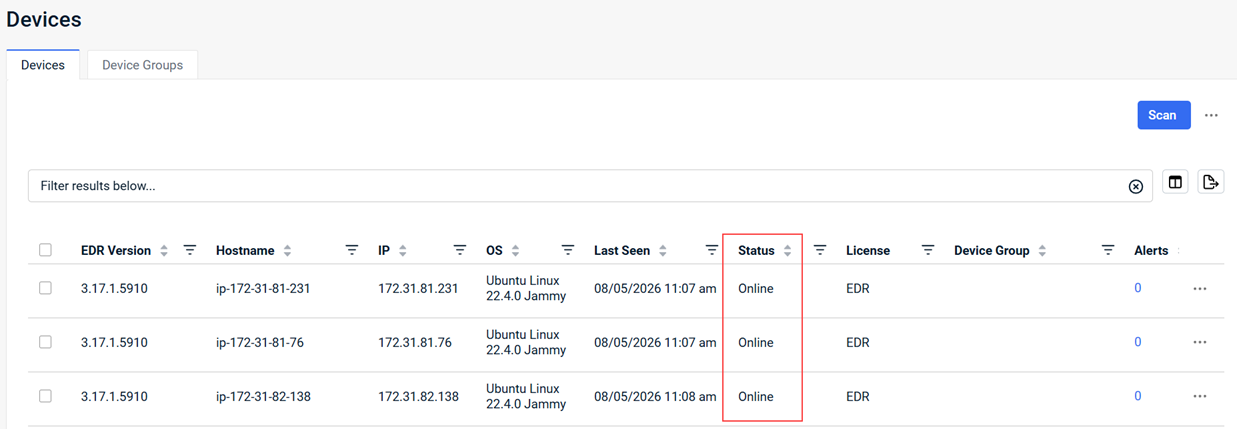
Refer to Working with the Location details page.
Delete policies associated with deleted entities
You can now delete policies that are linked to entities that have already been deleted, removing previously orphaned policy records. This keeps your policy list clean and accurate.
Host Isolation preserves Kaseya and Datto management tool connectivity
When you isolate a Windows host, Datto RMM, VSA X, RocketCyber, Datto Endpoint Backup v2, and Datto Secure Edge remain connected so you can continue managing and remediating the device without lifting isolation. This release also fixes related issues: isolated devices can no longer access bare domains that bypassed isolation, traffic enforcement is now consistent across web and terminal sessions, and critical troubleshooting actions like fetch log work correctly on isolated devices.
Precise delivery time for scheduled reports
Scheduled reports now support a specific delivery time, down to the hour and minute, so reports arrive when you need them rather than during a broad window. The delivery time reflects the local time zone of the user who configures the report, and a tooltip in the scheduling modal clarifies this. All existing scheduled reports have been assigned a default delivery time between 12:00 AM and 6:00 AM. Review your current scheduled reports and adjust these times to your preferred schedule. Note: The Report Format and Report Type fields have been removed from the New Scheduled Report dialog box. 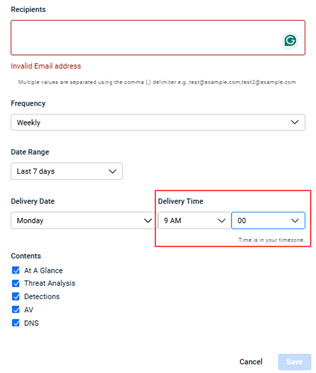
Refer to Navigating the Reports page.
EDR alerts show all severities when opened from RMM
When you open EDR from an RMM alert using the Open in Datto EDR button, the alerts table now displays all severity levels for that device instead of applying default severity filters. You get a complete view of the endpoint's security posture without manually adjusting filters after the redirect. 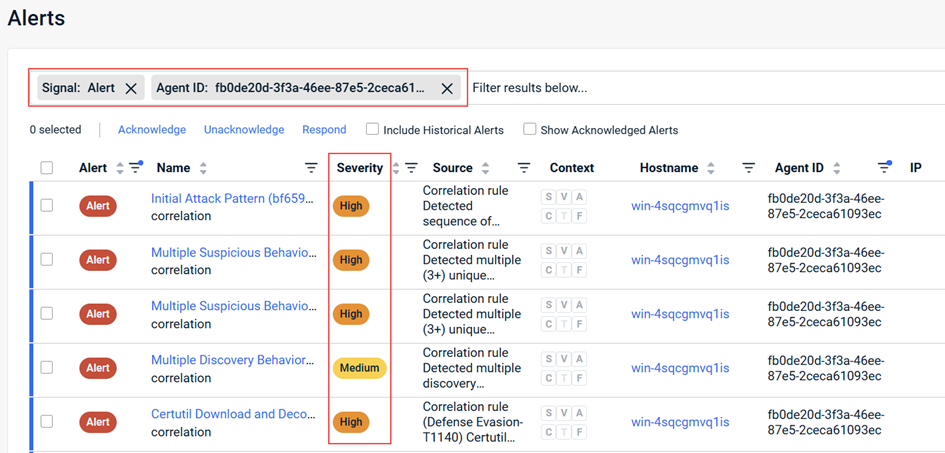
Sha256 search field supports full 64-character hashes
The Sha256 input field in the Search tab now accepts up to 64 characters, matching the full length of a standard SHA256 hash. Previously, the field was capped at 50 characters, which prevented complete hash lookups.
Fixes
- Location and device entries no longer disappear when you scroll through long lists with the Assigned Policies section expanded.
- Response overrides in an automated response policy now apply only to devices assigned to that policy. Previously, overrides such as isolating a host or ending a process were applied globally across all detection rules.
- Response actions such as Quarantine or Restore sent to offline devices are now queued and execute automatically when the device reconnects, instead of returning an error.
- The agent no longer encounters connection errors on startup when the network interface has not finished initializing, eliminating the unnecessary service restarts that resulted from this timing issue.
- Status filters selected from the Summary or Items tabs via the Tasks List page now apply correctly after redirection, so the results list shows only the entries that match your selection.
- Variable tags in scheduled notification email subject lines, such as the organization name, now populate with the correct values instead of displaying raw tags or "unavailable."
- Task counts in the Task List and Task Mini-Menu now match, giving you a single consistent view of pending and completed operations.
- The Detection Overview section of the Executive Threat Report now correctly scopes host counts and alert data to the selected location filter. Previously, AV-licensed host totals reflected the entire organization regardless of which location was selected.
- An invalid scheduling configuration in one scheduled job no longer blocks all other scheduled jobs in the same tenant from running.
- Exporting data to CSV from the Respond > Responses page no longer returns a 400 error.
- Improved the reliability of KaseyaOne telemetry delivery for billing, utilization, and reporting data.
Artifacts
agent.linux-amd64.48382c654930db19e4dc89bb1d56d9fc16f7fca45365108e5cae399567b8ea7c.bin.gz
agent.linux-arm64.5cf5bd24d86400c2e9d97cc2e38517106578069d42df8ce12ee2439d2f912c7e.bin.gz
agent.linux-x86.1cb4cc03956991a0f328287cb2738b3673837c29070fd3a22247e1c453aae31e.bin.gz
agent.macos-amd64.e6b61611e789ef3e14c9eb163e14d334b09575788ac11119d9aa49f8c39b7ab7.bin.gz
agent.macos-arm64.f6a9a1300a71b120e1be6571f64f6d93eb3e1dcd7a8b52e9f51834e4a34d60a0.bin.gz
agent.windows-amd64.4fd9563888bdaf5e05b54f4b013683ad9d451da8efac4fc614c947b207763cdc.exe.gz
agent.windows-arm64.88f0cba11d90868ced779e254ede1e6105676d8c3e5b200672cf70274118c1c8.exe.gz
agent.windows-x86.a13914ce4dafdb1816ff1d42f41624b59ad0f43e07782131fec5c76779fb5e81.exe.gz


