What are automated response policies?
NAVIGATION Policies > Automated Response Policy
PERMISSIONS Admin role
Automated response policies are predefined detection rules that perform recommended actions when a threat is detected on an endpoint. These policies can terminate malicious processes, quarantine suspicious files, and isolate compromised hosts from the network to contain threats and prevent lateral spread across your environment.
Automated response policies use a template-based approach to threat containment, enabling security administrators to quickly establish a baseline security posture with preconfigured settings. This helps minimize the time between threat detection and response.
The system supports three response actions:
- Kill: Terminates the malicious process.
- Quarantine: Restricts access to the suspicious file.
- Isolate: Disconnects the device from the network while maintaining management connectivity.
You can configure these actions by severity level to apply consistent protections across detection rules. For more granular control, rule-specific overrides allow you to customize response actions for individual threats without affecting global severity-based settings.
How it works
The Automated Response Policy follows a hierarchy of precedence to determine which response action to execute for a given detection:
- Rule-Specific Override: If a rule-specific override is defined, that override takes precedence.
- Severity Response Actions: If no override exists, the system checks the severity-level configuration:
- If "Use Rule Default" is enabled and the rule default specifies response actions, those actions are taken. Default rules are the Detection rules developed by EDR engineers to help Datto EDR identify potential threats and determine how to address them.
- Otherwise, the severity-level settings determine the response.
Automated response actions are compiled on the server side with detection rules so that responses execute locally on the endpoint, ensuring minimum delay between detection and response.
When a policy of this type attempts to carry out an action in response to a suspected threat, the triage measure taken and its outcome will appear in the Responses view of the Respond page. For further information, see the article Navigating the Respond page
Automated Responses section
The Automated Responses section allows you to select a starting template, configure severity-based responses, and manage rule-specific overrides.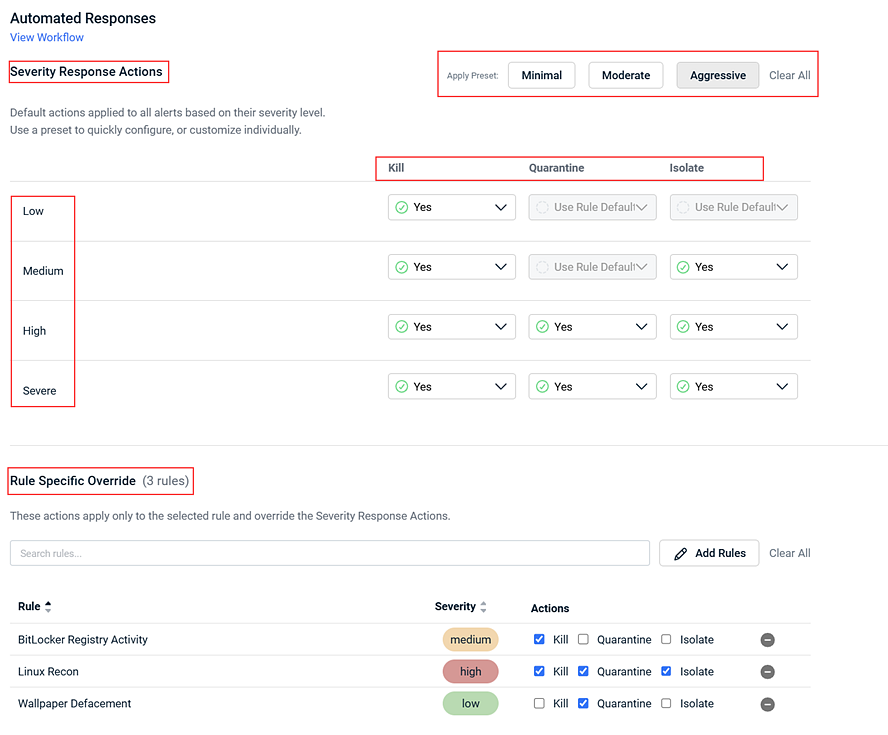
Severity settings
Each severity level (Low, Medium, High, Severe) has independent toggles for the three response actions. Changes to severity-level settings apply to all rules at that severity unless a rule-specific override is in place. To prevent accidental negative impact, certain options are restricted at lower severities (indicated as not available in the table below).
| Field | Description |
|---|---|
| Kill | Terminates the malicious process on the endpoint. Available for all severity levels. |
| Quarantine | Moves the detected malicious file to quarantine. Not available (greyed out) for Low and Medium severity levels. |
| Isolate | Isolates the affected endpoint from the network. Not available (greyed out) for Low severity level. |
Templates
Templates provide a starting point for your response policy. Select a template to quickly apply a pre-configured set of response actions across all severity levels. After applying a template, all settings remain fully editable. The table describes the default settings for each template.
Note: Applying a template changes severity-based settings but does not modify existing rule-specific overrides.
| Template | Description |
|---|---|
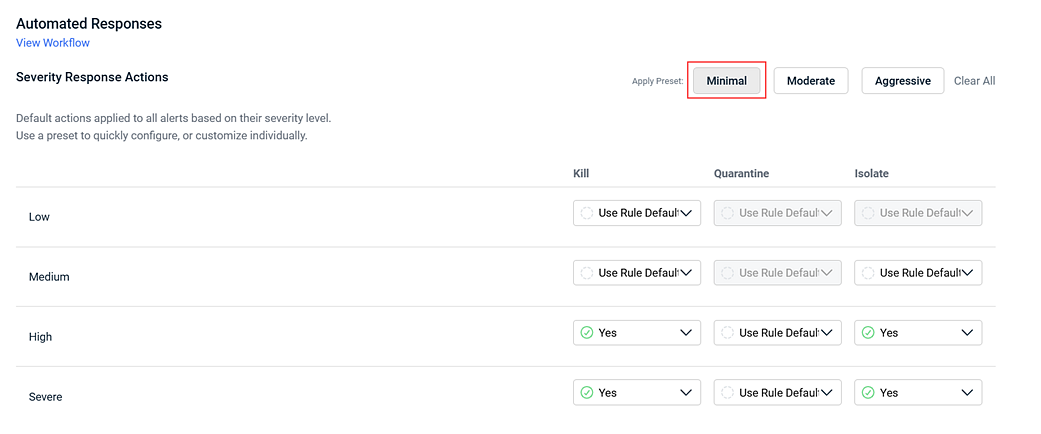
| Minimal |
Lowest intervention approach. Applies Kill process and Isolate host for High and Severe severity levels only. All other severity levels have no automated actions enabled. The following response actions are enabled for each severity level:
|
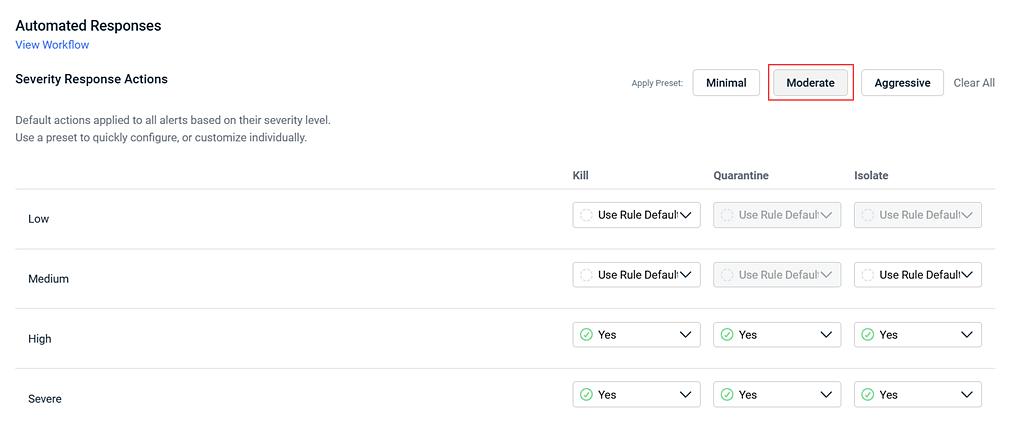
| Moderate |
Balanced approach. The following response actions are enabled for each severity level:
|
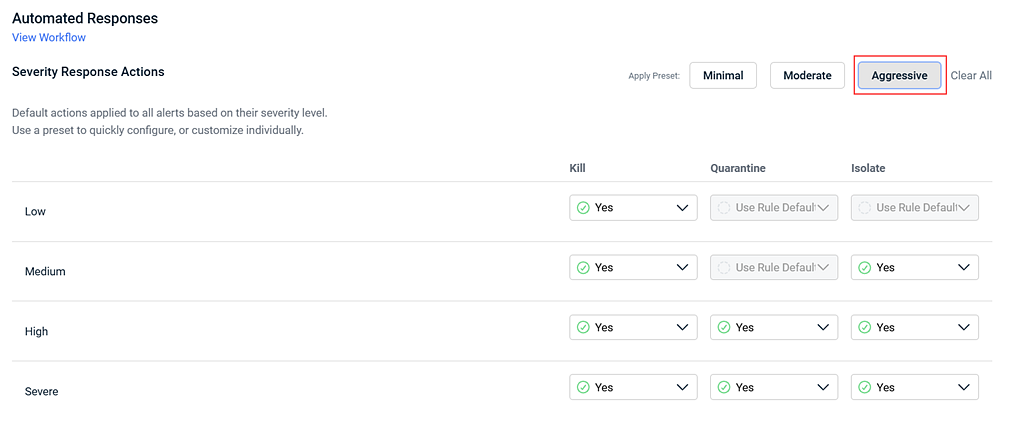
| Aggressive |
Maximum automated response. The following response actions are enabled for each severity level:
|
Rule specific overrides
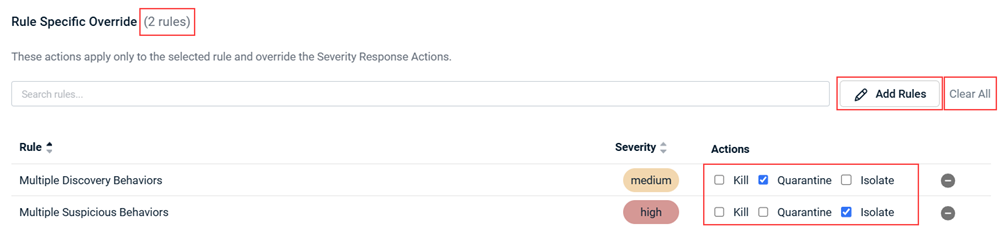
The Rule Specific Overrides section allow you to configure unique response actions for individual detection rules that differ from the severity-level defaults. Overrides always take precedence over severity-based settings.
| Field | Description |
|---|---|
| Override Count | Displays the number of rule-specific overrides configured, for example (2 rules). |
| Add Rules | Opens the interface to add, modify, or remove rule-specific override configurations. |
| Clear All | Removes all overrides for a given severity level. Affected rules revert to inheriting the severity-based defaults. |
How to...
 Apply a response template
To apply a pre-configured response template to your policy, complete the following steps:
- Navigate to the Policies page.
- Select the Automated Response policy you want to configure, or create a new Automated Response policy.
- Click one of the three template buttons: Minimal, Moderate, or Aggressive.
- Review the default severity-level settings the template has applied.
- Optionally, adjust individual severity toggles for the desired response actions (Kill, Quarantine, Isolate) on (Yes) or off (No).
Note: Some options may be greyed out at lower severity levels due to safety constraints. - Click Save to apply the policy.
The selected template's response actions are applied across all severity levels. Existing rule-specific overrides are preserved.
Add a rule-specific override
To configure a custom response for a specific detection rule, complete the following steps:
- Navigate to the Policies page.
- Select the Automated Response policy you want to configure, or create a new Automated Response policy.
- In the Rule Specific Override section, click Add Rules.
- In the Manage Custom Responses modal, select the detection rule(s) you want to override.
Note: Rules already added to the override list are removed from the selection list to prevent duplicates.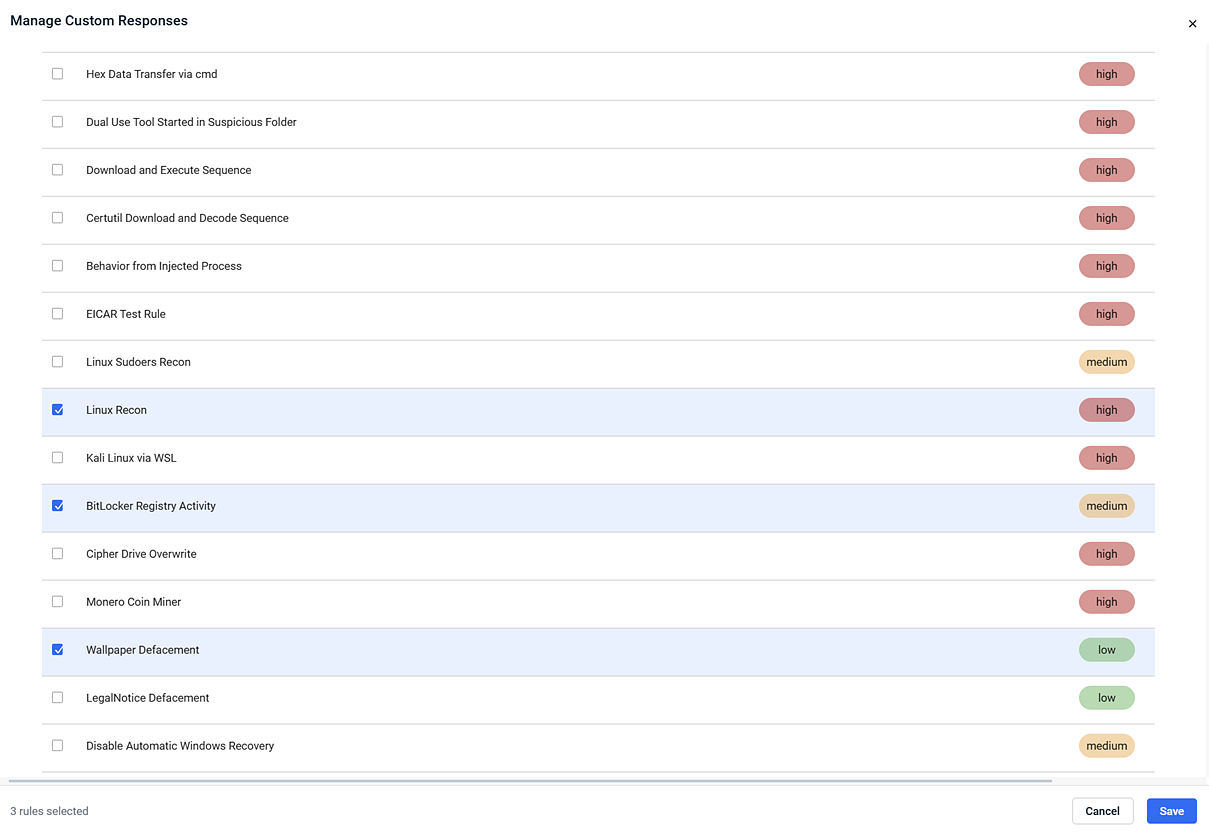
- Click Save.
- Configure the desired response actions (Kill, Quarantine, Isolate) for each selected rule.
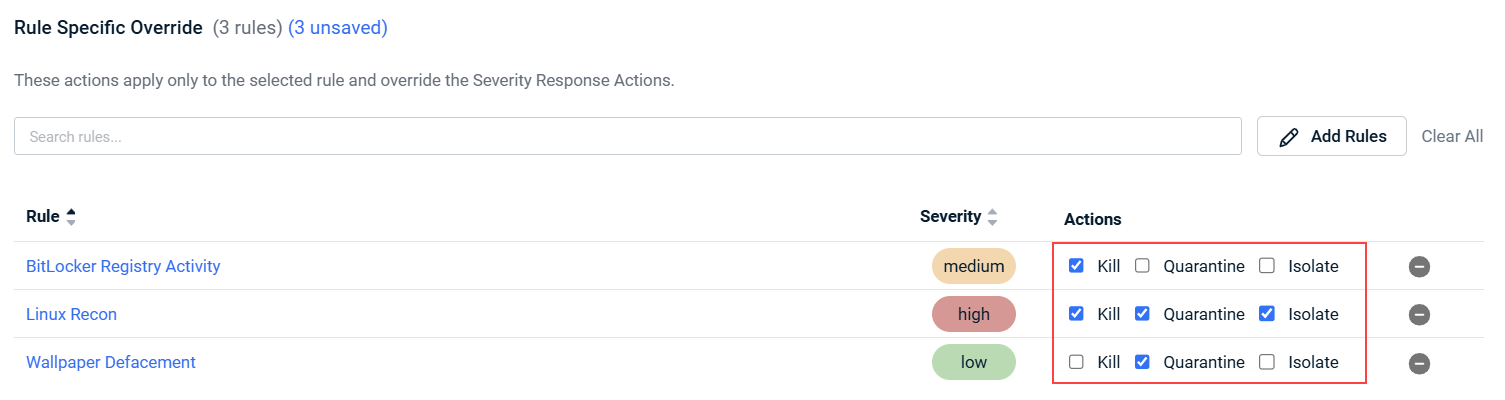
- In the top right of the Edit Policy, click Create/Save to apply the overrides.
The selected rules now use the override settings instead of inheriting from the severity-level defaults. The override count updates to reflect the new configuration.
NOTE To remove all rule-specific overrides and revert rules to the severity defaults, click Clear All.
FAQ
When should I apply an automated response policy?
Although it is natural to think automated responses should be applied when you are onboarding new customers, it is recommended you take some time to monitor existing behaviors first.
A good rule of thumb is implementing automated response policies 30 days after customer onboarding. During this ramp-up time, a typical customer will have triggered the baseline of alerts you'd expect to see in their environment. You will have the time to review these detections and the possible responses before applying policies.
Should I customize the response actions or leverage recommendations?
During the monitoring period, you should review the rules triggered along with the recommendations created by the Datto EDR Content Engineers to determine if the recommendation would disrupt the behavior in a way you are comfortable with.
There may be cases where the recommended response actions could disrupt legitimate business operations. In these situations, you can override the recommendations in the policy for a specific client.
For example, backup software running on a domain controller may create a dump of the Active Directory database (NTDS.dit) as part of normal backup activity. Although authorized, this behavior may trigger the NTDS Dump detection rule, which can recommend actions such as Kill Process or Isolate Host. To avoid interrupting approved business processes, administrators can customize the policy and override the recommended response actions, allowing the backup software to run without triggering automated remediation.
What about suppressed alerts?
Suppressed alerts supersede automated responses.
When an alert matches a suppression rule, no automated response actions occur. Suppressing specific, false positive alerts is better than overriding or customizing actions in the automated response policy as those changes apply to a rule and not the exact matched criteria from a suppression.
Should I set my automated response policy as a default policy?
A default policy can be beneficial when supporting endpoints in a known network or from a single business vertical such as retail or manufacturing.
This concept is based on the idea you are already aware of all the standard business applications and have created the suppression rules needed to address any applications that may trigger behavioral events. The opposite may apply to MSPs that support customers from multiple business sectors. In this case, it might be better to deploy new organizations without automated response policies so you can monitor the possible outcomes and adjust them before applying changes.
What happens if I switch from one template to another?
The severity-level settings change to match the new template, but your rule-specific overrides are preserved.
For example, if you switch from Aggressive to Minimal, the severity toggles update to the Minimal configuration, but any custom overrides you previously configured remain intact.
What happens to my existing policy after migration?
Existing policies are automatically analyzed and mapped to the closest matching template with no loss of configuration.
During migration, the system selects the template that most closely matches your current settings. Any unique configurations that do not fit the selected template are preserved as rule-specific overrides. Override counts are displayed next to each severity level so you can review what was migrated.
Why are some response options greyed out?
Safety constraints prevent enabling high-impact actions at lower severity levels.
To reduce the risk of accidental negative impact, Quarantine File is disabled for Low and Medium severity levels, and Isolate Host is disabled for Low severity. These constraints apply only to severity-based toggles—rule-specific overrides are not subject to these restrictions.
What is the order of precedence for response actions?
Rule-Specific Overrides take highest precedence followed by Severity Settings.
When a detection is triggered, the system first checks for a rule-specific override. If no override exists, it applies the response configured for the alert's severity level. If Use Rule Default is enabled and the detection rule has a predefined response, that response is used. If Yes is selected, the configured response action is performed for alerts of the selected severity. If No is selected, no automated response action is performed for alerts of the selected severity.
What happens if I remove a rule-specific override?
The rule reverts to inheriting the severity-based response settings.
Once an override is removed, the detection rule falls back to whatever response actions are configured at its severity level. No additional action is required.
| Revision | Date |
|---|---|
| Global edits. Added template info. | 8/18/26 |


