What are EDR detection rules?
NAVIGATION Policies > Detection Rules
PERMISSIONS Datto EDR subscription with administrator-level platform access or Datto AV subscription with administrator-level platform access. Service account or administrator-level rights on the target endpoint.
IMPORTANT Infocyte-created rule bodies can only be copied, modified or viewed by our internal detection engineers. Users can create and edit their own custom rules if desired.
NOTE Alerts generated by the rules engine display the rule body on the Alert Detail page. For more information, see the article Understanding the Alert Detail page.
This article defines EDR detection rules and explains how to build and edit your own rules using the Detection rules style guide.
Detection rules background
Detection rules run automatically against endpoint audit data as it is received by your instance. These rules help Datto EDR identify potential threats and determine how to address them. The rules we provide analyze your endpoints for processes and behaviors that align with the most common Adversarial Tactics, Techniques, and Common Knowledge (ATT&CK) techniques. When a rule is triggered, Datto EDR generates an alert and follows the workflow you have defined in your Automated Response Policy.
You can selectively enable, disable, and customize rules to tailor your instance's threat analysis procedures to the specific needs of your environment. These management options are available on the Detection page.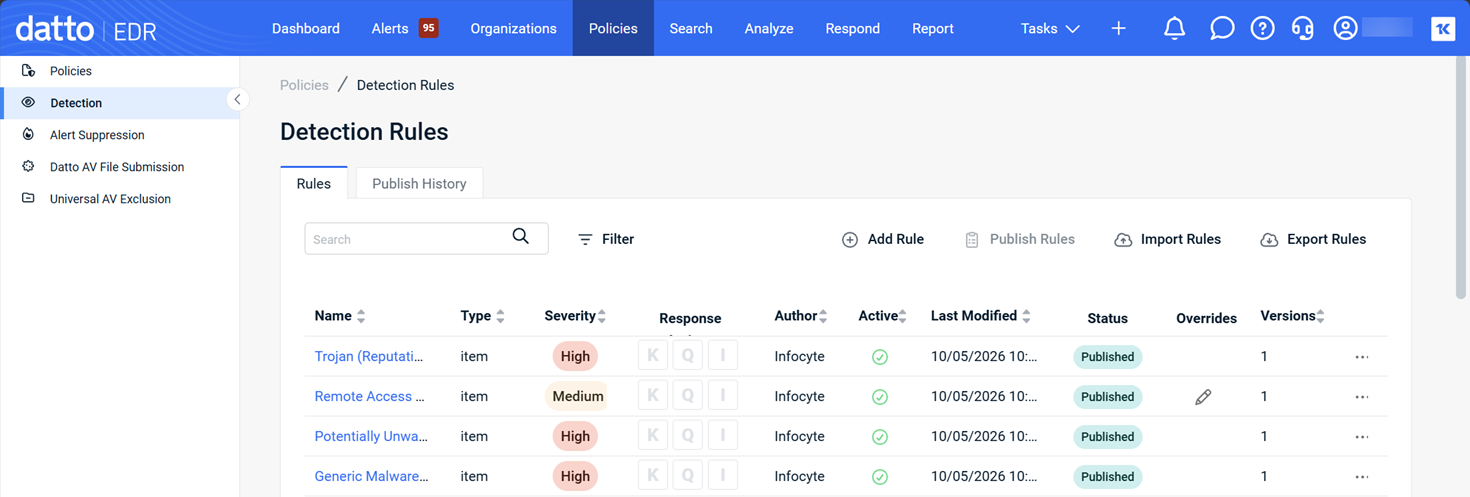
 Rules view
When you visit the Detection Rules page, the Rules view is selected by default.
| Feature | Definition |
|---|---|
| Rules |
Click to switch to the Rules view |
| Publish History |
Click to view a log of rule publication activity for your instance |
| Search field |
Enter a partial or whole value to filter the records displayed.; click Filter to apply additional search criteria |
| Add Rule |
Enables you to create a new detection rule by using the rule editor; for more information, refer to the Adding or editing rules section of this article |
| Publish Rules | Click to publish new rules and rules with configuration changes since the last publish |
| Import Rules |
Enables you to import new rules in YAML format; maximum file size is 100 MB. |
| Export Rules |
Enables you to export existing rules in YAML format; only custom rules can be exported |
| Field name | Definition |
|---|---|
|
Defines the characteristics that must be met before Datto EDR will act on the rule: Item: Agent will evaluate, alert, and take action against individual events as they are received to determine if the events are notable attacker behaviors EXAMPLE A PowerShell command's arguments would be evaluated by the rule and identified as a Correlation: Agent will evaluate all recent behaviors observed to determine if there is a pattern of threat behavior and, if so, act accordingly EXAMPLE A |
|
|
Severity |
The severity level of the alert that will generate if the rule is triggered |
| Response Actions |
If the rule is capable of automated response, indicates the type of action the Endpoint Security agent will attempt to take upon detection of a threat; the following values are possible:
|
| Author |
The name of the author who created the rule |
| Active |
Click the icon in this field to activate or deactivate the policy; |
| Last Modified |
The time and date the rule was last updated |
| Status | Indicates whether a rule is Published or Unpublished. |
| Overrides | The pencil icon indicates that an automated response override has been applied to the rule. |
| Versions |
Indicates how many versions of this specific rule have existed in your instance; version number iterates each time the rule is modified |

|
Click to delete the rule or view its previous versions |
 indicates that the policy is active;
  indicates that the policy is inactivePublish History view
The Publish History view displays a log of rule publication activity for your instance.
| Feature | Definition |
|---|---|
| Rules |
Click to switch to the Rules view. |
| Publish History |
Click to view a log of rule publication activity for your instance. |
| Search field |
Enter a partial or whole value to filter the records displayed. |
| Field | Definition |
|---|---|
| Published On |
The date and time of the rule's publication. |
| Published By |
The identity of the user or process that published the rule. |
Adding or editing rules
From the Detection Rules page, click Add Rule or click the name of an existing rule to open the editor. Populate or change the following fields, and then click Save.
IMPORTANT Once you create or edit an existing rule, you'll need to ensure that it's active and then click Publish Rules on the Detection Rules page before it will go into effect.
NOTE Infocyte-created rules can only be modified by our internal detection engineers, with the exception of the Actions and Severity options. These tenant-level overrides are preserved even when Infocyte pushes content updates to the base rules.
| Field or feature | Definition |
|---|---|
|
Name |
The name of the rule |
| Actions |
When active, rule will generate alerts. When inactive (in quiet mode), no alerts will generate |
|
Severity |
The severity level of the alert that will generate if the rule is triggered |
| Analysis Engine | Determines the analysis engine, Local or Cloud, that will process the rule. This lets you route complex rules that require reputation checks or cross-endpoint correlations to the cloud while keeping simpler rules processed locally. |
| MITRE ID |
The specific MITRE ATT&CK knowledge base ID to which the rule maps |
| MITRE tactic |
The specific MITRE ATT&CK tactic to which the rule maps |
| Short description |
A brief description of the rule that will appear in alerts that it generates |
| Rule type |
Defines the characteristics that must be met before Datto EDR will act on the rule: Item: Agent will evaluate, alert, and take action against individual events as they are received to determine if the events are notable attacker behaviors EXAMPLE A PowerShell command's arguments would be evaluated by the rule and identified as a Correlation: Agent will evaluate all recent behaviors observed to determine if there is a pattern of threat behavior and, if so, act accordingly EXAMPLE A |
| Description | The extended description of the policy's purpose, functions, and any other pertinent information |
| Rule Body |
Free-text editor in which you can specify the endpoint actions that Datto EDR should take if this rule is triggered; all syntax must be in YAML format |
Detection rules style guide
This style guide is intended for anyone creating custom detection rules, from first-time users to detection engineers.
Detection rules are written using the Infocyte Query Language (IQL). This guide explains how to create detection rules, starting with basic syntax and progressing to techniques used by experienced analysts.
How to Use This Guide
You do not need to read the entire guide. Start with the section that best matches your experience level.
| If you are... | Start here |
|---|---|
| New to detection rules | Read "What is a detection rule" through "Your first rule," then continue to "Testing a new rule safely." This provides everything needed to begin writing useful detection rules. |
| Comfortable with queries or scripting, but new to IQL | Start with "Step 1: Choose the event type," then work through Steps 1–4 and "Common mistakes." |
| A detection engineer | Use "Field reference," "Matching values," "Common mistakes," and "Notes for detection engineers" as reference material. |
All detection rules begin as drafts. Before deploying a rule, validate it against your environment to confirm it behaves as expected. See "Testing a new rule safely" for recommended validation practices.
What is a detection rule?
A detection rule is a single yes-or-no question that Datto EDR asks about each event on an endpoint:
"Does this activity match the conditions I am looking for?"
If the answer is yes, the rule triggers and Datto EDR either generates an alert or records an observation, depending on the rule configuration.
The following example is a complete detection rule:
type == "process" &&
lowercase(name) == "mimikatz.exe"
The rule can be read as: "A process starts and its name is mimikatz.exe." Both conditions must be true for the rule to match. This is a complete, working detection rule.
Common Mistake
A detection rule is a single logical expression, not a list of separate conditions.
Every condition must be connected with either:
- && (AND)
- || (OR)
If conditions are placed on separate lines without a logical operator, the rule is invalid.
Incorrect:
path == "c:\program files\tool-a.exe"
path == "c:\program files\tool-b.exe"
path == "c:\program files\tool-c.exe"
This example does not work because the conditions are not connected. Even if it were valid, a single file cannot exist at three different paths simultaneously. Conditions joined with && must all be true at the same time. When you want to match any one condition, use ||.
Correct:
path == "c:\program files\tool-a.exe" ||
path == "c:\program files\tool-b.exe" ||
path == "c:\program files\tool-c.exe"
Line breaks are used only to improve readability. A rule can be written on a single line or spread across multiple lines. The important requirement is that every condition is connected by a logical operator.
Detection rule elements
The Detection Rules page is where you create, edit, activate, and publish rules. Each rule consists of an event type, one or more field conditions, a severity level, and optional response actions.
Event types
Every rule starts with a type field that names the kind of endpoint event being watched. Type names are singular and lowercase (for example, autostart, not autostarts). If you omit the type, the rule will not behave as expected.
| Event type | What it captures |
|---|---|
process
|
A program starting. The most common starting point. |
connection
|
A network connection. |
autostart
|
Something configured to run at startup — a service, a Run key, a scheduled task. |
amsi
|
A script inspected by Windows as it ran (PowerShell, JScript, VBScript). |
filerep
|
A file found on disk. |
driver
|
A loaded kernel driver. |
artifact
|
Evidence of past execution, such as a Shim Cache entry. |
application
|
Installed software. |
account
|
A local user account. |
memscan
|
A suspicious region found in memory. |
EXAMPLE type == "process"
Fields by event type
A field is one piece of information about an event. Only use field names from the tables below. If you use a field name that does not exist for the event type, the rule will not error — it will silently never match, which is much harder to notice.
Fields available for process event type
| Field | Type | Description |
|---|---|---|
name
|
text | The program's file name, for example powershell.exe. |
path
|
text | Full path to the program on disk. |
commandLine
|
text | The full command line the program was started with. |
decodedPayload
|
text | A decoded version of the command line — reveals encoded commands. |
parentProcessName
|
text | The program that started this one. |
parentCommandLine
|
text | That parent's command line. |
grandParentProcessName
|
text | The program that started the parent. |
owner
|
text | The account it ran as, for example CONTOSO\jsmith or NT AUTHORITY\SYSTEM. |
signed
|
true/false | Whether the file carries a valid digital signature. |
signature.subjectName
|
text | Who signed it, for example Microsoft Corporation. |
signature.issuerName
|
text | The certificate authority that issued the signature. |
md5, sha1, sha256 |
text | File hashes. |
size
|
number | File size in bytes. |
entropy
|
number | How "scrambled" the file looks — high values suggest packed or encrypted content. |
versionInfo.originalfilename
|
text | The name compiled into the file — catches renamed files. |
versionInfo.companyname
|
text | Company name from the file's properties. |
versionInfo.productname
|
text | Product name from the file's properties. |
pid, ppid |
number | Process ID and parent process ID. |
bitness
|
number | 32 or 64. |
isDotNet
|
true/false | Whether it's a .NET program. |
started
|
date/time | When the process started. |
EXAMPLE
type == "process" &&
lowercase(name) == "powershell.exe"
NOTE Entering the field in lowercase(), like lowercase(name), makes the comparison case-insensitive.
Fields available for connection event type
On a connection event, the details of the program making the connection live under a process. prefix. Use process.commandLine, process.parentProcessName, and process.owner. Writing a bare commandLine on a connection rule will not match. Ports are numbers, not text: use remotePort == 443, never remotePort == "443".
| Field | Type | Description |
|---|---|---|
remoteAddr
|
text | The address being connected to. |
remotePort
|
number | The port being connected to. |
localAddr, localPort |
text, number | The local side of the connection. |
proto
|
text | TCPv4, TCPv6, UDPv4, or UDPv6. |
state
|
text | "2" listening, "5" established, "8" close_wait. |
processName
|
text | The program that owns the connection. |
processSha1
|
text | That program's SHA1. |
process.*
|
— | The full set of process fields, nested. See the process table above. |
EXAMPLE
type == "connection" &&
lowercase(process.name) == "powershell.exe" &&
remotePort == 443
Fields available for autostart event type
| Field | Type | Description |
|---|---|---|
kind
|
text | The type of entry. Values: Run Key, Service, AppInit DLL, Image Hijacks, Known DLL, Security Support Provider, Print Monitor Dll, Windows Socket, Network Provider. |
name
|
text | The entry's name. |
path
|
text | The program the entry points to. |
place
|
text | The registry key or folder it lives in. |
commandLine
|
text | The command line it will run. |
signed
|
true/false | Whether the target file is signed. |
digitalSignature.*
|
— | Signature details. Note: use digitalSignature here, not signature. |
md5, sha1, sha256, size, entropy |
— | Same meaning as on process. |
IMPORTANT On autostart and artifact events, the signature object is called digitalSignature, not signature. Using signature here won't produce an error — the rule will just never match. This is one of the most common silent failures.
Fields available for amsi event type:
Always check both content and deobfuscatedContent. Attackers layer obfuscation specifically to defeat checks against the raw content.
| Field | Type | Description |
|---|---|---|
appName
|
text | What ran the script: PowerShell, JScript, VBScript. |
content
|
text | The script content. |
deobfuscatedContent
|
text | A cleaned-up version with obfuscation stripped. |
contentPath
|
text | The script's file path — empty for commands typed inline. |
name, path, commandLine, owner, parentProcessName |
text | The process that ran the script. |
Other event types
These event types share a common set of file fields: name, path, md5, sha1, sha256, size, entropy, signed. Additional fields are noted for each.
| Event type | Additional fields |
|---|---|
filerep
|
created, modified, signature.* |
driver
|
digitalSignature.*
|
artifact
|
kind, executedOn, modifiedOn, digitalSignature.* |
application
|
name, version, publisher, installDate, vendor, product |
account
|
name, domain, uid, priv (0 standard / 1 machine / 2 elevated), logonType, numLogon, badPasswordCount, passwordAge |
memscan
|
method, protection, size, entropy |
Severity and response actions
Each rule requires a severity level and optionally a response action. When in doubt, choose the lower severity level — you can raise it once you've seen what the rule catches. See Adding or editing rules.
| Severity | Use when |
|---|---|
| High | Known-bad activity that needs attention. |
| Medium | Suspicious and worth investigating, but has legitimate uses. |
| Low | Informational, policy awareness, baseline anomalies. |
Response actions can be configured to execute automatically on the endpoint when a rule matches. Do not enable these on a new rule — only attach a response action to a rule you have watched in quiet mode and are confident in. See What are automated response policies?
| Action | Effect |
|---|---|
| K — Kill | Attempts to kill the suspected process. |
| Q — Quarantine | Quarantines the file. |
| I — Isolate | Isolates the endpoint from the network. |
Your first rule
The following example demonstrates how to create a detection rule from start to finish.
Suppose you want to detect when rclone.exe runs. Rclone is a file transfer utility commonly used to move data between systems.
- Identify the activity to monitor. A process starting is represented by:
type == "process" - Choose the field to evaluate. The executable name is stored in the name field.
- Define the match condition. Because the exact file name is known, use an exact match. Wrap the field in lowercase() to make the comparison case-insensitive.
- Combine the conditions with &&.
type == "process" &&
lowercase(name) == "rclone.exe" - Configure the rule:
- Set Severity to Medium.
- Leave the rule in quiet mode for testing.
- Save the rule.
- Ensure the rule is Active.
- Click Publish Rules.
Most useful detection rules are this simple. Complex expressions, regular expressions, and advanced logic are often unnecessary unless addressing a specific detection scenario.
Complete example
Goal: "Alert me when an unauthorized remote-access tool appears on an endpoint." Unauthorized remote-access software is a common way an attacker keeps access to a network.
The tools of concern are LabTechRemoteAgent.exe, ScreenConnect.ClientService.exe, and SRService.exe.
Rule version 1
The simple rule:
type == "process" && (
lowercase(name) == "labtechremoteagent.exe" ||
lowercase(name) == "screenconnect.clientservice.exe" ||
lowercase(name) == "srservice.exe"
)
This rules means a program is starting, and its name is one of these three. No regex needed. To watch for another tool later, copy a line and change the name.
Problem you may experience with this rule
If your organization legitimately uses any of these tools, this rule fires every time that tool starts, on every endpoint that has it. That's not a detection, it's an inventory report.
Before enabling this, confirm which of these tools are actually unapproved in your environment. Remove the approved ones — or read on.
Rule version 2
Legitimate remote-access software installs properly under Program Files. Software dropped by an attacker typically runs from a temp folder, a user's profile, or ProgramData. So instead of asking "is this tool here?", ask "is this tool running from somewhere it shouldn't be?"
type == "process" &&
path == iregex(`\\(labtechremoteagent|screenconnect\.clientservice|srservice)\.exe$`) &&
path != iregex(`^c:\\program files( \(x86\))?\\`)
The rule means the following:
type == "process" — a program is starting
path == iregex(...) — its path ends in a backslash, one of the three names, then .exe
path != iregex(...) — and it is not installed under Program Files or Program Files (x86)
Match example: C:\Users\jsmith\AppData\Local\Temp\ScreenConnect.ClientService.exe C:\ProgramData\srservice.exe
Non-match example: C:\Program Files (x86)\ScreenConnect Client\ScreenConnect.ClientService.exe C:\Program Files\Splashtop\Splashtop Remote\Server\SRService.exe
This version is far quieter than the first, and it doesn't require you to know in advance which tools are approved — properly installed software excludes itself.
NOTE False-alarm: legitimate installations in non-standard directories will still match. If you have one, add another exclusion line for its specific path.
How to...
Write a detection rule
To write a detection rule in IQL, complete the following steps:
- Choose the event type. Start every rule with a
typefield. Example:type == "process". Type names are singular and lowercase. - Choose the fields. Add one or more field conditions using only field names that exist for that event type. Invented or misspelled field names fail silently — the rule will never match.
- Choose a match method. Work down this list and stop at the first one that does the job:
- Exact match — use whenever you can:
name == "powershell.exe" - Case-insensitive exact match — the everyday default for file names and paths:
lowercase(name) == "powershell.exe"
This should be your default for anything involving a file name or path. - Number and date comparisons —
size < 100000 && entropy > 6.5; for dates usedate(started) > trailingDays(30) - IP address matching —
remoteAddr != privateIp()orremoteAddr != cidr("10.0.0.0/8") - Regex — only when nothing above will do. Use
iregex()for case-insensitive matching. Wrap patterns in backticks. Anchor patterns with^(starts with) and$(ends with). See Appendix: Regex.
- Exact match — use whenever you can:
TIP Check for empty fields. Some fields are empty on some events — decodedPayload is empty when nothing was encoded, contentPath is empty for a command typed inline. Test for that with null:decodedPayload != null. (! means not).
An empty field compared against any pattern simply doesn't match, so in an || chain you usually don't need an explicit null check — the other side of the || still gets evaluated.
- Combine conditions. Join all conditions with
&&(AND) or||(OR). Use parentheses whenever you mix&&and||to avoid unintended grouping.
TIP Wrap every || group in its own parentheses. This removes all doubt.
- Set severity. Choose the lowest severity level that reflects the risk. You can raise it once you've seen what the rule catches.
The rule body accepts only IQL — no comments or explanatory text inside the rule.
Test and publish a new rule
BEFORE YOU BEGIN Write and save your rule before following this sequence. Every new rule should start in quiet (non-alert) mode.
To safely test and publish a new rule, complete the following steps:
- Save the rule in quiet mode. (Alert option is turned off.) No alerts, no response actions.
- Set the rule to Active, then click Publish Rules. A saved rule does nothing until it's both active and published. New rules take a few minutes to reach your endpoints.
- Watch the rule for a few days. Review what it matches and how often:
- No matches at all? Either the behavior isn't happening, or the rule has a silent problem. Check for common mistakes such as a misspelled field name or wrong signature object name.
- Far more matches than expected? Your pattern is too broad, or you're catching approved software. Add exclusions one at a time.
- Matching roughly what you expected? Good. Move on to the next step.
- Trigger the rule deliberately if you safely can. Running the monitored tool on a test machine is the fastest way to confirm the rule works.
- Switch to alert mode. Only after the quiet-mode watch period.
- Consider response actions later, if at all. Wait days or weeks of clean alerting before enabling Kill, Quarantine, or Isolate actions.
Use the Versions column on the Detection Rules page to review or roll back changes. Every edit creates a new version.
Reduce false alarms
If a rule fires on normal activity, narrow it by adding one or more of the following conditions with &&. Add one at a time and watch the effect before adding another.
- Skip digitally signed files:
signed == false - Skip Windows system directories:
path != iregex(`^c:\\windows\\system32\\`) - Restrict to risky parent processes:
parentProcessName == iregex(`^(winword|excel|powerpnt|outlook)\.exe$`) - Skip built-in system accounts:
owner != iregex(`nt authority\\`) - Target small, high-entropy files typical of packed malware:
size < 100000 && entropy > 6.5 - Exclude a specific known-good program:
lowercase(parentProcessName) != "yourbackuptool.exe"
Adding exclusions one at a time lets you see the effect of each change. Adding several at once and finding the rule matches nothing tells you very little about which exclusion caused the problem.
Appendix: Regex
Regular expressions (regex) match flexible patterns, such as any file name ending in .scr or any path containing a Temp folder. While powerful, regex is also one of the most common causes of broken detection rules. To reduce errors, this guide applies strict standards for using regular expressions.
IMPORTANT Before you write a regex, ask: can I do this with exact matches instead? Several exact matches joined with || is almost always better than one clever pattern.
Mechanics
Use iregex() for case-insensitive matching. Use regex() only when capitalization genuinely matters — which, for Windows file names and paths, it almost never does.
Patterns are wrapped in backticks, which lets you use both ' and " inside the pattern without ending the string early:
path == iregex(`\\appdata\\local\\temp\\`)
Escaping characters in a regular expression is different from creating an exact match. This distinction is one of the most common sources of errors.
| You want to match | With an exact match | Inside a regex |
|---|---|---|
|
A single backslash \ |
\ — type it once |
\\ — type it twice |
|
A literal dot . |
. — type it once |
\. — a bare . means "any character" |
|
A literal ( or ) |
( — type it once |
\( and \) |
So the path C:\Program Files (x86)\ becomes, inside a regex:
^c:\\program files \(x86\)\\
Rules
Anchor your pattern
^ means "starts with," $ means "ends with." An unanchored pattern matches anywhere in the value, which is usually broader than you intended.
-
matches only cmd.exe, exactly:
lowercase(name) == iregex(`^cmd\.exe$`)
-
matches anything under c:\windows\
path == iregex(`^c:\\windows\\`)
-
matches any path ending in \evil.exe, in any folder
path == iregex(`\\evil\.exe$`)
Use | inside a single pattern for alternatives
Group them with parentheses:
name == iregex(`^(cmd|powershell|wscript|cscript)\.exe$`)
|| and | are not the same thing. || is the boolean OR that joins two complete conditions. | is the regex alternation that separates choices inside one pattern. You cannot put || between two regex patterns inside a single function call — that is invalid.
WRONG — || cannot appear inside a function call
path == iregex(`\\Temp\\` || `\\Downloads\\`)
RIGHT — one pattern, alternatives separated by |
path == iregex(`\\(temp|downloads)\\`)
RIGHT — two complete conditions joined by ||
path == iregex(`\\temp\\`) ||
path == iregex(`\\downloads\\`)
TIP Be specific enough that normal activity doesn't match. A short generic word on its own — run, data, admin — will match constantly. Add context: a folder, a parent program, a command-line flag.
Incorrect examples
| Pattern | Description |
|---|---|
|
.*cmd.* |
A short word wrapped in wildcards matches almost everything. |
|
.*, .+, . alone |
Matches every event. |
|
(.*)+, (a+)+, (.*)* |
Nested repetition can make the engine hang. |
|
Anything you can't explain piece by piece |
If you can't explain it, you can't predict what it does. |
Check your work
For any regex you write, do this before you publish it:
- Write down two real values that should match.
- Write down two similar values that should NOT match.
- Read the pattern against all four by hand.
If you can't complete that exercise, the pattern isn't ready. If step 2 is hard to answer, your pattern is probably too broad.
Common detection rule mistakes
The issues below are listed in order of how frequently they cause a rule to "not work."
| Symptom | Cause | Fix |
|---|---|---|
|
Rule never matches |
Conditions stacked on separate lines with no operator |
Join every condition with && or ` |
|
Rule never matches |
Field name misspelled or doesn't exist on that event type |
Check the Field reference. Wrong names fail silently. |
|
Rule never matches |
Used signature on an autostart or artifact event |
Use digitalSignature on those types |
|
Rule never matches |
Used commandLine on a connection event |
Use process.commandLine — process details are nested |
|
Rule never matches |
regex() where the real value differs in capitalization |
Use iregex(), or lowercase() with an exact match |
|
Rule never matches |
Backslash written once inside a regex |
Inside a regex, one \ is written \\ |
|
Rule never matches |
Number compared as text: remotePort == "443" |
Drop the quotes: remotePort == 443 |
|
Rule never matches |
Used * as a wildcard inside a plain string |
* is literal in an exact match. Use iregex() for flexible matching. |
|
Rule never matches |
Event type pluralized: type == "processes" |
Types are singular: process, autostart, driver |
|
Rule never matches |
Rule saved but not published, or not Active |
Set Active, then Publish Rules |
|
Fires on everything |
Unanchored or overly short pattern |
Anchor with ^ and $; add context |
|
Fires on everything |
A bare . in a regex where you meant a literal dot |
Escape it: \. |
|
Fires constantly on legitimate software |
No exclusions |
Add signed == false, a path exclusion, or a parent filter |
|
Grouped wrong / matches unexpected things |
Mixed && and ` |
|
|
Parse error you can't see |
Curly quotes “ ” pasted in from a document |
Retype as straight quotes " " |
|
Parse error you can't see |
Explanatory text left inside the rule body |
The rule body accepts only IQL — no comments or notes |
Notes for detection engineers
Always pair commandLine with decodedPayload.
Encoding a command line is the standard way to defeat a commandLine-only check. The agent decodes what it can into decodedPayload. Check both, always:
type == "process" && (
commandLine == iregex(`invoke-webrequest`) ||
decodedPayload == iregex(`invoke-webrequest`)
)
The same principle applies to amsi: check content and deobfuscatedContent together.
Catch renamed binaries with PE metadata
Renaming a tool changes name and path, but not the metadata compiled into the file:
type == "process" &&
lowercase(versionInfo.originalfilename) == "psexec.exe" &&
lowercase(name) != "psexec.exe"
That fires only when PsExec has been renamed — a much stronger signal than PsExec running under its own name. The same shape works for any tool with reliable PE metadata.
Signer identity beats the signed flag
Plenty of malware is signed, with a stolen or cheap certificate.
signed == false is a blunt instrument
When you care about provenance, check the signer:
signed == true &&
signature.subjectName != iregex(`microsoft`)
Negative lookahead for path scoping
Supported, and sometimes tidier than a separate exclusion condition:
path == iregex(`^(?!c:\\windows\\system32\\).*\\powershell\.exe$`)
Two separate conditions joined with && are usually easier for the next person to read. Choose deliberately.
Empty vs. absent
A field that is empty or absent never matches a pattern — it does not match, and it does not error. In practice this means a || chain across commandLine and decodedPayload is safe without null guards. But it also means a rule that silently matches nothing looks identical to a rule watching for behavior that isn't happening. When a rule returns zero, verify the field is populated on the events you expect before assuming the behavior is absent.
eventTime is not comparable across event types
The meaning of the timestamp depends on the event type. On a process it's the creation time; on an autostart it's when the entry was collected; on an application it's the install date. Don't build logic that compares timestamps between event types.
Correlation rules
The Rule type field offers Item and Correlation.
- Item rules — everything in this guide — evaluate one event at a time.
- Correlation rules look across multiple recent events to spot a pattern, such as a download followed by a decode followed by an execution.
Correlation rules are evaluated in the cloud, not on the endpoint, because aggregating across events requires the whole event population. They use additional syntax not covered here. If you have a multi-step behavior you want to detect, raise it with your Datto EDR contact rather than approximating it with item rules.
Quick reference
Structure
type == "<eventtype>" && <condition> && ( <condition> || <condition> )
Exact match, case-insensitive — the default
lowercase(name) == "tool.exe"
Several alternatives
type == "process" && (
lowercase(name) == "a.exe" ||
lowercase(name) == "b.exe"
)
Regex, anchored, case-insensitive
name == iregex(`^(cmd|powershell)\.exe$`)
path == iregex(`^c:\\users\\[^\\]+\\downloads\\`)
Exclusion
signed == false
path != iregex(`^c:\\windows\\`)
Numbers and dates
remotePort == 443
size < 100000 && entropy > 6.5
date(started) > trailingDays(30)
Network
remoteAddr != privateIp()
remoteAddr != cidr("10.0.0.0/8")
Recommendations
| Topic | Recommendation |
|---|---|
|
One expression |
Join everything with && / ` |
|
|| vs | |
|| joins conditions; | separates alternatives inside one regex |
|
Escaping |
Exact match: paste the path as-is. Regex: \\ for a backslash, \. for a dot |
|
Case |
lowercase() or iregex(), essentially always |
|
Nesting |
connection events nest process details under process |
|
Signatures |
signature on process/filerep; digitalSignature on autostart/artifact/driver |
|
Rollout |
Quiet mode > watch > alert mode > response actions, in that order |
Glossary
- Anchor: ^ (starts with) and $ (ends with), which stop a pattern matching anywhere in a value.
- Detection rule: Yes/no condition Datto EDR evaluates against endpoint activity.
- Event type: Kind of activity being watched: a program starting, a network connection, a startup entry.
- Exact match: Checking that a value equals something precisely; for example, name == "cmd.exe".
- False positive: Match on activity that is not actually malicious.
- Field: One piece of information about an event; a program's name, its path, its command line.
- Infocyte Query Language (IQL): Language detection rules are written in. Loosely resembles JavaScript.
- Publish: Pushes saved rule changes into effect. Rules do nothing until published.
- Quiet/non-alert mode: Rule runs and records matches without raising alerts. Where every new rule should start.
- Regular expression (Regex): Flexible pattern-matching language. Powerful, easy to get wrong, used sparingly.
- Response action: Something the agent does automatically on a match; kill, quarantine, isolate.
- Severity: How serious a match is, from low to high.
FAQ
Why does my rule never match anything?
Most silent failures are caused by a missing operator, a misspelled field name, or the wrong signature object.
Work through this checklist:
- Missing operator: Every condition must be joined with
&&or||. Conditions on separate lines with no operator between them will not work. - Misspelled or wrong field name: Wrong field names fail silently. Check the field reference tables and confirm the field exists for your event type.
- Wrong signature object: Use
signatureonprocessandfilerepevents. UsedigitalSignatureonautostart,artifact, anddriverevents. - Process fields on connection events: On
connectionevents, process details are nested underprocess.. Useprocess.commandLine, notcommandLine. - Case sensitivity: Use
iregex()orlowercase()for file names and paths. A plainregex()match where the real value differs in capitalization will never match. - Backslash inside a regex: One backslash in an exact match is written as
\. Inside a regex, one backslash must be written as\\. - Port as text: Ports are numbers. Use
remotePort == 443, notremotePort == "443". - Event type pluralized: Types are singular. Use
process, notprocesses. - Rule not published: A rule does nothing until it is both set to Active and published via Publish Rules.
When should I use regex, and how do I write it safely?
Use regex only when exact matches and alternatives joined with || won't do the job. When you do write one, anchor it and test it against known good and bad values before publishing.
Regex is the single biggest cause of broken detection rules. Before writing one, ask: can I do this with exact matches instead? Several exact matches joined with || is almost always clearer and safer.
When you must use regex:
- Use
iregex()for case-insensitive matching (the default for Windows paths and file names). - Wrap patterns in backticks:
iregex(`pattern`). - Anchor patterns with
^(starts with) and$(ends with) to prevent unintended broad matches. - Inside a regex, write
\\for a backslash and\.for a literal dot (a bare.matches any character). - Use
|inside a single pattern for alternatives:iregex(`^(cmd|powershell)\.exe$`). Do not use||inside a regex function call. - Before publishing, write down two values that should match and two similar values that should not, and verify the pattern against all four by hand.
Patterns to avoid: .*cmd.* (short word in wildcards matches almost everything), .* or .+ alone (matches every event), and nested repetition such as (.*)+ (can cause the engine to hang).
How do I detect a tool that has been renamed?
Match on PE metadata rather than the file name — renaming a tool changes its name and path but not the metadata compiled into the file.
Use versionInfo.originalfilename to catch renamed binaries. For example, this rule fires only when PsExec has been renamed — a much stronger signal than PsExec running under its own name:
type == "process" &&
lowercase(versionInfo.originalfilename) == "psexec.exe" &&
lowercase(name) != "psexec.exe"
The same approach works for any tool with reliable PE metadata.
What is the difference between item rules and correlation rules?
Item rules evaluate one event at a time on the endpoint. Correlation rules look across multiple recent events in the cloud to spot multi-step patterns.
The Rule type field on the Detection Rules page offers two options:
- Item — evaluates a single event at a time on the endpoint. This is the type covered throughout this article.
- Correlation — evaluates across multiple recent events, for example a download followed by a decode followed by an execution. Correlation rules are evaluated in the cloud because aggregating across events requires the whole event population. They use additional syntax not covered here.
If you have a multi-step behavior you want to detect, contact your Datto EDR representative rather than approximating it with item rules.
| Revision | Date |
|---|---|
| Initial release. | 9/8/25 |
| Section: Adding or editing rules - Added Analysis Engine content. | 9/17/26 |
| Expanded Detection rules style guide. | 9/29/26 |
|
Section: Adding or editing rules - Edited Note: Infocyte-created rules can only be modified by our internal detection engineers, with the exception of the Actions and Severity options. |
10/22/26 |


