EDR v15123 release notes – released June 4, 2026
NOTE Datto EDR uses a staggered release process. You receive an in-product notification when updates are available for your instance. To confirm the UI version running on your Datto EDR instance and to view or modify your scheduled maintenance window, see How to confirm your UI version and maintenance window.
Version information
| Endpoint Security Agent | Ransomware Agent | Rollback Agent | API |
|---|---|---|---|
|
3.17.1.5409 |
1.5.2.3 |
1.4.4.225 |
5.0.0 |
Enhancements
File deletion confirmation for alert responses
Datto EDR now displays a confirmation prompt before you delete a file in response to an alert. The prompt requires you to verify the action to help prevent you from accidentally deleting a file. All delete actions are logged to support auditability and administrative review.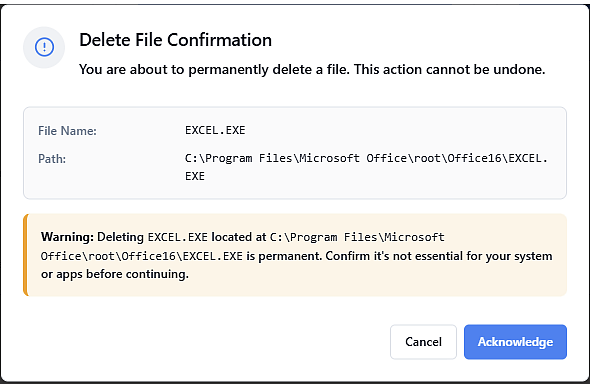
Enhanced delete file reliability
Deleting files on Windows devices is now more reliable. This update fixes “Access Denied” errors that could happen when files were locked or had limited permissions. As a result, file deletions now work more reliably across all supported Windows versions.
Fixes
- Resolved an issue on the Search page where the time selection window could open behind the main interface. The time selector now consistently appears in the foreground, allowing you to adjust the absolute time range.
- An issue has been resolved where the Datto EDR agent’s AMSI component could cause Microsoft Word and Excel to crash. Security monitoring now runs without impacting application stability.
- Resolved an issue where the default sort order on the Organizations and Locations pages was not displayed in ascending alphabetical order (A–Z).
- The agent no longer becomes unresponsive during its initial compatibility check. A new fallback mechanism detects when the server does not respond in time and automatically applies default configuration values, allowing the agent to continue its main operations. Agent installation and heartbeats now proceed without interruption, even under challenging network conditions.
Canary fix
Implemented mitigations to address an issue where the AMSI component generated false detections for third-party security products registered as AMSI providers.
The Working with third-party products article has been updated to note that this issue may reoccur as additional scenarios are identified.
Artifacts
agent.linux-amd64.21183bae6304cb8947a384456d917f264423534a6e3f1d698f9c4c4e3408524b.bin.gz
agent.linux-arm64.1577fe10290d30650b54610aba4128fa595c931d8da753ae829d2fc9a359fe9f.bin.gz
agent.linux-x86.c66c668bd778b1e053195fec40f8f0d1bf78c7c54a719ca0a7bec1d5849e2e25.bin.gz
agent.macos-amd64.b997c6222f1f0776b44e528d70099892dc62a8868c0be120f029cce2c3bed4ac.bin.gz
agent.macos-arm64.1ef25e240e30d286aea2dfeae72ab3094df3cefee2483be1d1bc4cccaef523dc.bin.gz
agent.windows-amd64.901f4fc3950ac3db1ce26f4aec348908cd67f2178c3653c30baf44150af9d860.exe.gz
agent.windows-arm64.2b9f176b36a15fa9c47c3166adfac1575297ef701b23dd307b3c3c9f682b9620.exe.gz
agent.windows-x86.2354b85cd0d0e69c50a5d71bc3f6d639b93a591d98ee3ab76c875ce0f89ce656.exe.gz


