EDR v15070 release notes – released May 14, 2026
NOTE Datto EDR uses a staggered release process. You receive an in-product notification when updates are available for your instance. To confirm the UI version running on your Datto EDR instance and to view or modify your scheduled maintenance window, see How to confirm your UI version and maintenance window.
Version information
| Endpoint Security Agent | Ransomware Agent | Rollback Agent | API |
|---|---|---|---|
|
3.17.1.5311 |
1.5.2.3 |
1.4.4.225 |
5.0.0 |
New Features
Device Status Monitoring table
You can now view a detailed history of a device’s online and offline status changes directly on the Device details page. The new Status Monitoring table tracks when each device goes online or offline, providing up to 180 days of history. This makes it easier to troubleshoot connectivity issues and monitor for recurring patterns, helping you maintain the environment.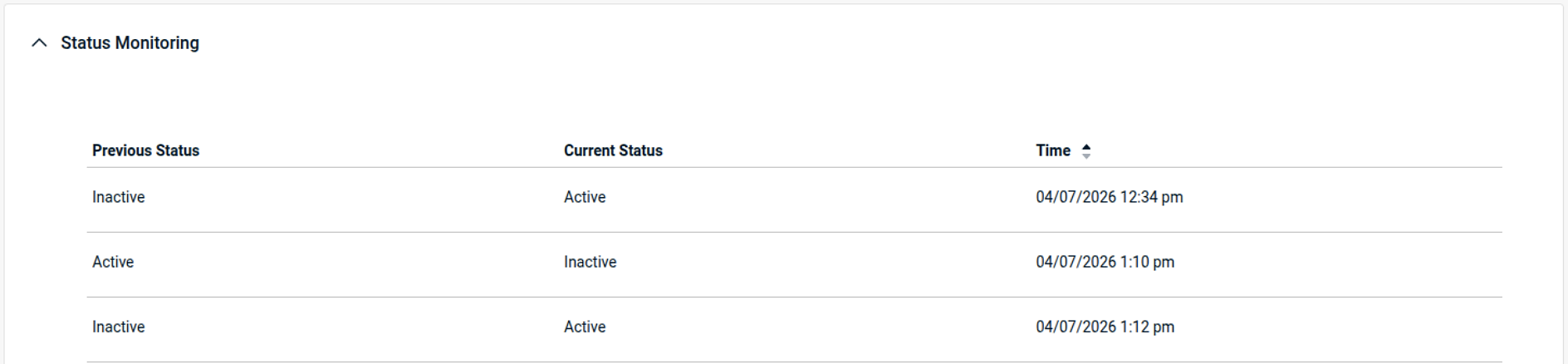
Enhancements
AMSI improvements
This release enhances Datto EDR’s AMSI capability to improve detection coverage and operational consistency, including better support for 32-bit processes on 64-bit Windows and refinements to how AMSI keyword state is retained. Overall, the changes improve reliability while reducing unnecessary AMSI keyword requests and logging overhead.
Datto EDR’s Windows agent code-signing process to use SHA-256
Datto EDR's Windows agent code-signing process has been updated to use SHA-256 for the agent and related components, helping you meet modern security and compliance requirements without changing expected agent behavior.
AV license removal warnings and confirmation
When you unassign an AV license from a device, the UI now clearly warns you that this action uninstalls the AV engine and permanently deletes quarantined files. You must also explicitly confirm the action before the license is unassigned, helping prevent accidental AV removal and unintended quarantine data loss.
Improved Datto AV scanning
Datto AV scanning has been improved so that Datto EDR now returns a clear error when AV scan data is not yet available, helping prevent hung scan tasks and reducing clutter in the Tasks list. Previously, starting a Datto AV scan before the AV engine was fully initialized could leave the scan stuck in a "started" state.
Fixes
- Datto EDR agent on Windows could use increased system resources over time. With this fix, you should see improved endpoint stability and more consistent performance during long-running agent operation.
- A fix has been applied for an issue where KaseyaOne Login User Exceptions only displayed and searched the first 25 users, which could prevent you from adding or viewing exceptions for users beyond the first page. You can now search and select any user as expected when managing KaseyaOne login exceptions.
- An issue has been fixed where some rule-based alerts could open as a blank page (or fail to load) when you opened the alert details link in a new browser tab. Alert details now display as expected, and the create suppression rule flow can populate match criteria more reliably when launched from affected alerts.
- An issue has been fixed where file analysis tasks could fail and show as failed on the Task List page when submitting files for analysis. This restores more reliable file submission behavior and helps ensure the Task List page accurately reflects analysis activity instead of showing repeated failures.
Artifacts
agent.linux-amd64.a7edb85aaf6255294069e4a83a48fae96b6d48bc08f1ba3b27c4fd443c6bcfb3.bin.gz
agent.linux-arm64.6303cea5d7e813ea1c11842c51bc0eb4061eca4aafc160664bc35330fb94048f.bin.gz
agent.linux-x86.162f8663f619222cb5fa4423663621cf926745821d75cb8c90b48c748a6bdf8b.bin.gz
agent.macos-amd64.a9f28b7760d5fe46e45b01cf23427ed51d426f57c296b4c88e7c83f02b071572.bin.gz
agent.macos-arm64.b173bd0b3dde4eaed0fa6576f6e9d6d86cc3389bd141acca517060d7a4b122c1.bin.gz
agent.windows-amd64.cdcbdc3820b19d7070374197a1633bf321327e8e6e5f6c80bbd66c06f7fd0976.exe.gz
agent.windows-arm64.7daa577788a8eaeeedac81c3c2fc6eae77166196f978bafc3f00629fa8d12f87.exe.gz
agent.windows-x86.9ab566db953a03ac3707d8c9763586d59b9c9d557254c0970823dad9b522083b.exe.gz


