Creating Datto EDR webhooks
NAVIGATION  > Admin > Webhooks
PERMISSIONS Service account or administrator-level rights on the target endpoint
You can configure Datto EDR to send webhook notifications to any platform that can receive them. This article explains how to create and configure them.
NOTE For information about how to receive webhook notifications in a third-party application, contact the corresponding vendor for support.
About webhooks
 What are webhooks?
Webhooks are an efficient way to exchange information between applications.
Traditional API calls provide information in response to a query. To get updated information via an API call, you must keep polling the application.
EXAMPLE "Were any new threats detected in my environment since the last query?
Were any new threats detected in my environment since the last query?
Were any new threats detected in my environment since the last query?..."
Imagine that only 2% of the time, you receive a positive answer. All that network traffic, so little to show for it.
Webhooks, on the other hand, work on a "Don't call me, I'll call you if I have something new" basis. The server-side application calls the client-side application (by invoking a client-provided webhook URL) any time that the server-side has something new to report to the client. When an event happens, a notification routes to any registered subscribers in the form of an HTTP POST request. The information (or 'payload') arrives in JSON format on port 443.
EXAMPLE "An audit revealed a new threat in your environment, and here is the endpoint name, IP address, threat type, reputation information, and risk."
Use cases
You can use webhooks to notify you of nearly all of the same information you can find on the Alerts page in the EDR UI, including the following critical data points:
- Originating EDR instance of the alert
- Threat type
- Threat weight
- Impacted hostname
- File name of the threat object
- Malicious or non-malicious
You can also use external ID fields or user-defined reference fields for reliable data mapping. You can always include them in the payload, even if you have not updated them.
Who can (or should) use webhooks?
Datto EDR webhooks can and should be created by administrators and vendors who are building integrations with the platform, and vendors who are building connectors to middleware products.
Using webhooks instead of regular API calls can lead to a significant reduction in the number of inbound calls against our API platform, which will increase performance for all API users. But there are significant advantages for the integration developer as well. Webhooks enable you to design applications differently than a polling application, and you can often implement them with less coding. Webhooks for actions like creating and updating can be specific to that action. With the polling approach, code must handle checking for a large number of records, often caching data and comparing fields to determine what has changed. With webhooks, developers can build integrations faster and for a lower cost.
Additional advantages:
- Near real-time notifications: The speed with which you can discover that a threat was detected can be limited by polling time intervals. Webhooks provide almost instantaneous notification of threat activity.
- Reduced risk of hitting API thresholds: Your risk of reaching any applicable maximum API call thresholds becomes reduced without the need to do polling.
Prerequisites
Before you can use webhooks, you'll need to ensure that the following prerequisites are met.
Set up a web service that listens for HTTP POSTs from Datto EDR
Your company will need to set up the following pieces of infrastructure:
- A web service that will receive and process any webhook callouts from Autotask.
- A webhook URL to which the webhook payload will post.
Both items are required to create webhooks.
TIP You can use a service like RequestBin.com while you are creating and testing your webhooks.
Identify the types of alerts you'd like to receive
Datto EDR can send extensive amounts of detail about each threat it identifies. You'll construct your alerts by using body variables. Determine the level of information you'd like to send to your recipient platform in each alert and how you will parse that information.
Every field in the alert metadata is sent as part of the webhook, so you don't need to configure webhook bodies. However, you can create your own user defined fields consisting of key value pairs.
Unique fields
|
accountId active agentId authorized avPositives avRatio avThreatName avTotal blocked commandLine compromised contentType created_date created_on criticalFailure decodedPayload defenderAlertType detectionId detectionName detectionOrigin detectionSoure detectionState detectionTime detectionUser deviceGroupId deviceId deviceShortId engineVersion eppType eventTime executed_on executionStatus failed failureResolved falgId fileCreated fileModified files fileSize flagColor flagId flagName flagWeight grandParentProcessName groupId heartbeat hostId hostInfo.agentId hostInfo.architecture hostInfo.cpe23Uri hostInfo.deviceId hostInfo.deviceShortId hostInfo.domain hostInfo.hostname hostInfo.ip hostInfo.os hostInfo.osVersion hostInfo.rmmAccountId hostInfo.rmmDeviceId hostInfo.rmmSiteId hostInfo.vsaId hostname hostOs hostScanId |
id instanceId ip isolated itemId itemType kind locationId malicious malware managed markedForUninstall markedForUpdate markedForUpdateOn md5 messageId messageType modifiedOn monitoredJobFetched name nativeQuarantine notMalicious organizationId organizationName originalPath os owner package params parentProcessName path pid place policyMetadata postExecutionStatus ppid preExecutionStatus processName quarantined quarantineGuid qurantineItemName raw realTime remediationResources remediationTime remediationUser resolvedReason rmmAccountId rmmSiteId ruleActions.alert ruleId ruleMitreId ruleMItreTactic ruleName ruleSeverity |
search sha1 sha256 signal signature signature.issuerName signature.serialNumber signature.subjectName signature.type signed size sourceName sourceType ssdeep staticAnalysis suggestions suspicious targetGroupId targetGroupName tenant threatCategory threatDetection threatId threatInfoData threatName threatScore threatSeverity threatStatus threatStatusTime threatType type uid uninstallAgent unknown url utcTime vdfVersion vsaId whitelist |
Getting started
To create webhooks, perform the following steps:
Create the webhook
-
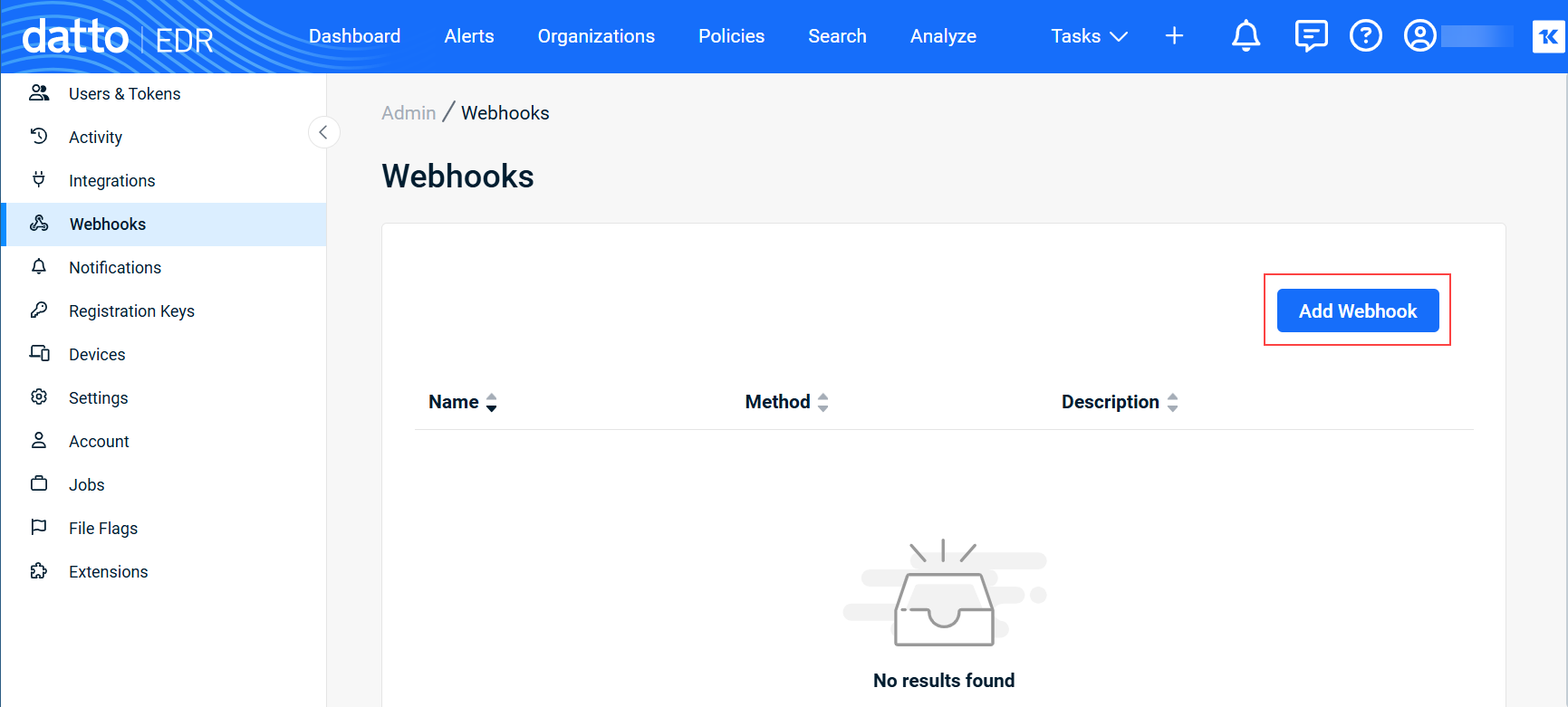
Within the EDR platform, navigate to
> Admin > Webhooks. -
Click Add Webhook.
-
The Add Webhook modal will open.
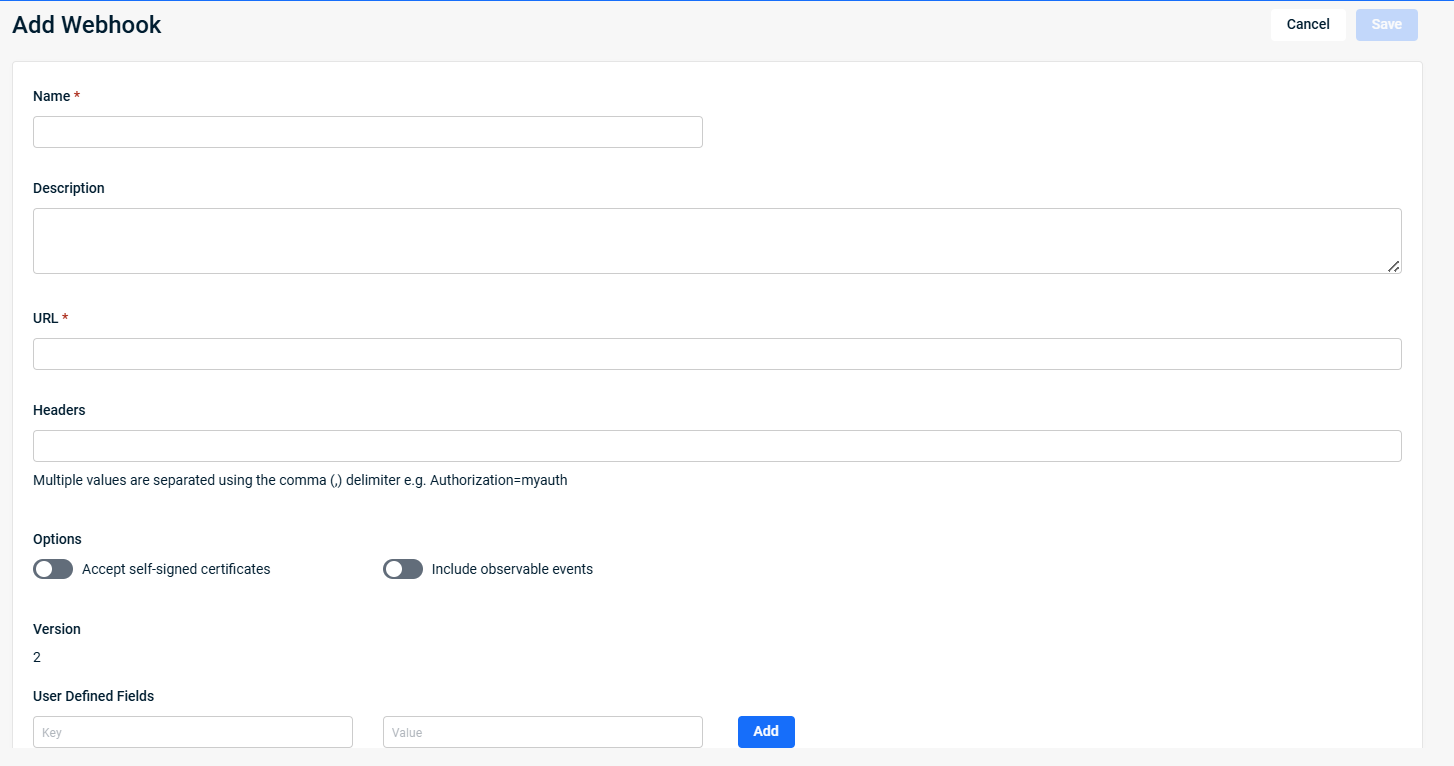
Complete the following fields.
| Field name | Definition |
| Name |
Enter a human-readable name for the webhook. This name will appear in the list at |
| Description (optional) |
Provide a description of the webhook's purpose. This information is useful to system administrators that are managing multiple notifications. |
| URL |
Input the URL to which the webhook payload will post. |
| Headers |
Specify any necessary headers that this webhook may need to use when communicating with your web service. Separate multiple values with a comma and no space. |
| Accept self-signed certificates |
Certificates authenticate a site as secure. Self-signed certificates are intended for testing websites and intranet sites. Trusted certificates are used for public websites. Activating this toggle disables our trusted check. |
| Include observable events |
Select this option to also send observable events as webhook alerts, which are non-alerting behaviors detected by Datto EDR. Note that activating this option will increase the number of alerts you receive. Before doing so, we recommend reviewing the alert table to determine how many non-alert detections you receive to better understand the potential increase in volume. |
| User Defined Fields |
If you want to create your own key value pairs to send along with the metadata listed in the Unique fields table:
|

- Click Save to create the webhook. It will appear in the list on the Webhooks page.
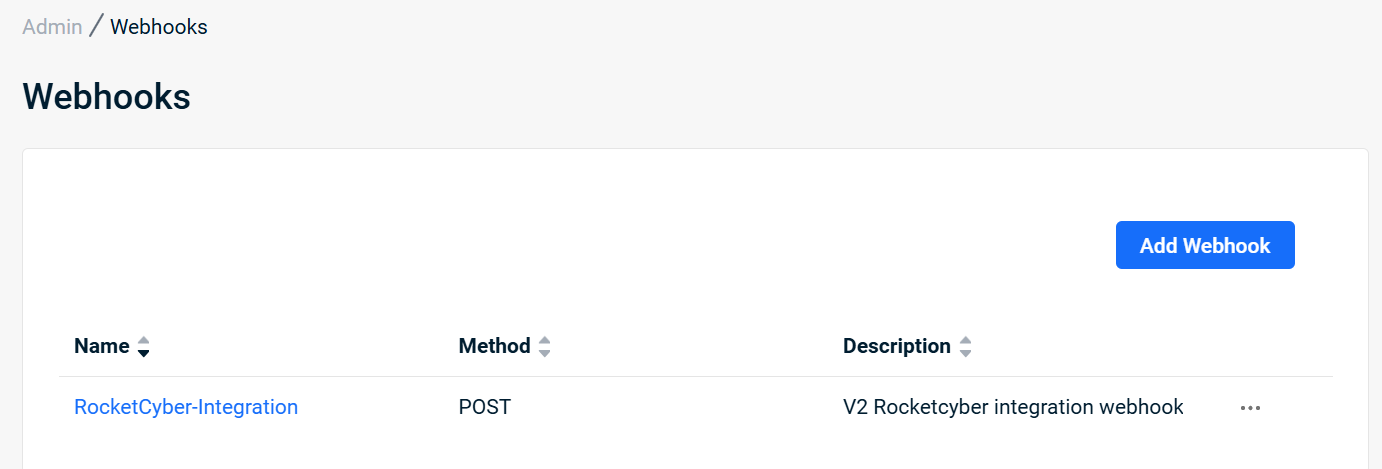
NOTE If your application is having trouble receiving events from Datto EDR, click View Errors from the
 menu to troubleshoot the issue.
| Revision | Date |
|---|---|
| Deleted Body variables section. Updated screens. | 8/7/25 |
| Added Unique fields table. PR: Added steps for User Defined Fields. | 12/31/25 |


